Getting started
How to sell books on Amazon KDP: the whole path, from niche to profit
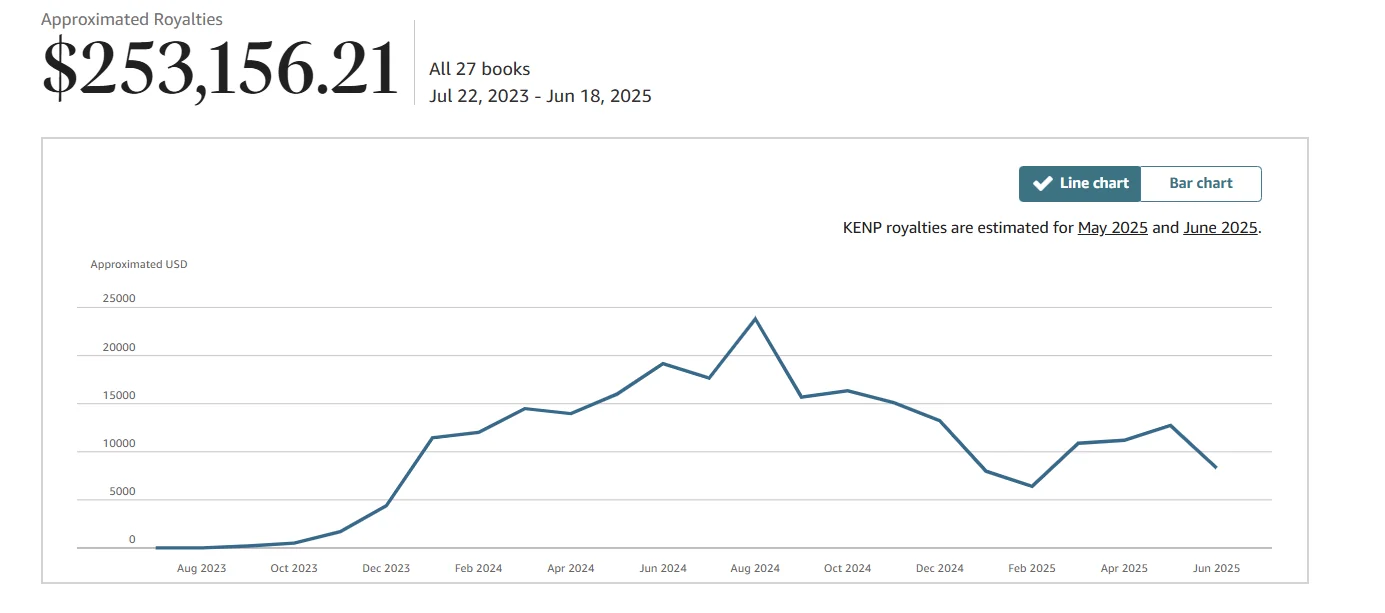
To sell books on Amazon KDP, you pick a niche with proven demand, publish a paperback (and optionally Kindle and hardcover) through KDP, and run Amazon Ads until the book ranks on its own. Amazon prints each copy on demand and ships it; you earn a royalty, minus printing and ads. Below is the whole path in order: what KDP pays, what it really costs to start, and each step to your first sales, with links to the detailed guides.
What Amazon KDP is
Kindle Direct Publishing is Amazon's self-publishing service. You upload the interior file and the cover, set a price and click Publish. From there Amazon does the rest: shows the book in search, takes orders, prints a paperback after someone buys it, packs it and ships it.
That's the key difference from a traditional publisher: no print run, no warehouse, no upfront printing cost. A book nobody buys costs you nothing — it just sits in the catalog.
There are three formats: Kindle eBook, paperback and hardcover. One book can be published in all three, and they share one product page. More on the service itself: what is Amazon KDP, and an honest list of its upsides and downsides: KDP pros and cons.
Note that KDP is not Seller Central. Selling physical books you've bought (new or used) goes through a seller account, inventory and shipping. Publishing your own book goes through KDP, with no inventory at all. This article is about KDP.
Where the money comes from
Amazon doesn't buy your book; it pays a share of each sale. That's your royalty, and there are three models:
- Kindle eBook — 35% or 70% of the list price.
- Paperback — 60% of the list price minus printing cost (on Amazon.com, for list prices of $9.99 and up; 50% below that).
- Hardcover — the same idea, with a higher printing cost.
The 70% eBook rate isn't automatic. On Amazon.com it needs a price between $2.99 and $12.99 (the cap was $9.99 until July 7, 2026), a sale in a 70% territory, an eBook price at least 20% below the print edition, and a book that isn't mostly public domain (KDP Help). Outside the price band, the sale earns 35%. The paperback thresholds are in KDP Help.
For example, a large-format 75-page black-and-white paperback at $24.99 costs $2.84 to print and earns $12.15 per copy. The same book in standard color costs $4.02 to print and earns $10.98 (printing costs).
Check any book in Amazon's royalty calculator, and what's left after ads in our KDP royalty and break-even ACOS calculator (ACOS is ad spend as a share of ad-attributed sales). Why a cheaper book isn't always better: KDP royalties explained. The eBook side in detail, including KDP Select and the 2026 DRM change (since January 20, 2026, buyers can download DRM-free EPUB or PDF copies of books published without DRM, Amazon's copy lock): how to sell ebooks on Amazon KDP.
What it costs to start
Publishing is free, keeping the book on sale is free, and printing is deducted from each sale. But starting isn't free, and this is where the money goes in our experience:
| Item | Cost | When you pay |
|---|---|---|
| Publishing and printing | $0 upfront | deducted from each sale |
| Writing the text | $0–1,000 | once |
| Cover and A+ Content | about $200 | once |
| Advertising | $500 → $1,000+ → $2,000+ over three months | monthly, in advance |
A working budget for a first book in 2026 is $3,700 to $4,700, depending on how much you do yourself. If you write the book yourself, the writing line is zero.
The biggest line isn't the book — it's advertising. And you need it for three months ahead: Amazon pays royalties about 60 days after the end of the month, while ad spend is charged every day. Without ads, nobody sees a new book: it has no search rankings and no reviews yet.
This is where most people stop: they budgeted for the book, and the money was needed for ads.
And a word on expectations. In our accounts, ads take 30–50% of royalties, so roughly what you put into ads is what you keep as net. For example, $1,000 a month in ads brings about $2,000 in royalties: half goes to ads, about $1,000 stays. About $2,000 in ads — about $2,000 net. These are our numbers in good months, not a forecast: in a weak niche the same budget can lose money. You can start with a minimal $10–20 a day, but the result is different: few sales, about $200 a month net, and only if everything goes right.
The full breakdown: how much does it cost to self-publish on KDP. What authors actually earn, with real numbers: how much do KDP authors make. A realistic plan for the first milestone: your first $1,000 on KDP.
From zero to first sales
The order isn't arbitrary: each step rests on the previous one, and going back is expensive.
Step 1. The niche
The niche matters more than the quality of the writing. A flawless book in a saturated topic will sell worse than an average book where there's demand and few competitors.
Check the niche before a single line is written. You can't fix a bad niche with a cover or with ads: ads only show a weak product to more people, faster.
A quick check: search your topic on Amazon, look at the top ten books from independent publishers, and note their Best Sellers Rank (BSR) and review counts. Our rule of thumb: the niche is alive if competitors' BSR is under 40,000. Above 100,000 with 0–20 reviews, the topic is probably dead.
For niche research we use AuthorLens, an analytics dashboard made only for Amazon KDP. We use AuthorLens daily and have a business relationship with it. Its Discover and Opportunities screens show niches and categories, and Books and Compare let you look at competitors side by side. Full review: AuthorLens review.
Free tools help at the start too: the DS Amazon Quick View browser extension shows BSR right in search results, and Google Trends shows general interest in the topic.
Among paid tools, Helium 10 also works — promo codes from Vova Even: VOVA10 — 10% off for life, VOVA6M20 — 20% off the first six months. Or Publisher Rocket. Compared: best KDP tools, Helium 10 for KDP, Publisher Rocket review.
How to check deeper and spot a fading niche: how to find a profitable KDP niche.
A word on coloring books. They're the most popular way in: nothing to write, the interior comes together in an evening. That's exactly why every beginner goes there — and exactly why, in the vast majority of cases we've seen, it ends $1,000–2,000 in the red. The numbers: are coloring books profitable on KDP.
Step 2. The book and the cover
You can write the book yourself or hire a writer; in our experience the text alone costs about $1,000. Some niches don't need text at all — but "easier to make" doesn't mean "easier to sell". How to put the book together, from the brief and page count to formatting and Amazon's AI rules: how to create a book for KDP.
The cover is in the budget either way, and it's not the place to save. In search results the buyer sees the cover first and the title second. If you get impressions but no clicks, the problem is almost always the cover, not the ads.
For a paperback, cover dimensions depend on page count and paper type: the spine of an 80-page book differs from a 200-page one. The KDP cover calculator gives you a template for your exact book — give it to your designer so the layout doesn't have to be redone. The full guide: KDP book cover.
Step 3. The account
Beginners make the most mistakes here — not because it's hard, but because Amazon doesn't forgive mismatched data. One missing letter in a name and instead of a book business you spend a month writing to support.
You'll need your legal name and address exactly as they appear on your ID and tax records, a tax interview (a W-9 for US persons, a W-8BEN for most individuals outside the US), and a bank account or an approved payment service for royalties. Since August 1, 2026, KDP pays only through payment providers in its approved program or directly to a bank account (KDP Help).
Step by step, with the fields and the tax interview: KDP account setup. Publishing from outside the US: Amazon KDP for non-US authors. You don't need a company to start: do you need an LLC for Amazon KDP.
Step 4. Publishing
Publishing itself takes 10–15 minutes. The hard part isn't the buttons — it's that some fields can never be changed after publishing, and some only within three days.
Before you click Publish, know what locks: what you can't change after publishing on KDP. And separately, the seven keyword boxes you fill in at publishing: Amazon KDP keywords.
Two newer rules to plan around. The language can't be changed after publishing, and only KDP-supported languages are accepted, so decide it before you order the text. And KDP now lets you create no more than 2 new titles per format each week (KDP Help); other 2026 changes are in KDP rule changes 2026.
The full walkthrough from Bookshelf to the Publish button, with print costs and groundwood paper: how to publish a book on Amazon KDP.
Step 5. Reviews
A book with zero reviews converts poorly even when the ads bring clicks. Get the first ones the legitimate way — Amazon removes reviews and can close accounts for anything that looks bought or traded. What works and what's forbidden: how to get book reviews on Amazon.
Step 6. Advertising
A new book doesn't sell by itself. Ads aren't for "getting famous"; they bring the first sales, and those sales are what make Amazon start showing the book in organic search. How that organic share grows, with our numbers: organic vs ad sales on KDP.
The key number here is break-even ACOS: the level above which ads lose money. The most frustrating state in this business is orders every day and nothing in the bank, and the reason is almost always this number.
The second is budget. In our experience a campaign starts collecting useful data from $15–20 a day; below that you pay for learning that never finishes. And plan for three months: the first KDP payment arrives about 60 days after the end of your first month of sales, while ads are charged daily.
How to calculate break-even ACOS and why we judge ads by profit: Amazon Ads for authors: profit, not ACOS. Where your ads show and how to bid: Amazon Ads placements and bidding strategy. How to see what each book earned after ads: KDP sales dashboard. Whether video ads pay off for books: video ads for books.
Already have a finished book? How to sell it on Amazon
A common case: the book is done — your own or a translation — and the only question is how to sell it. The path is shorter, but the steps are the same:
- Find your shelf. Open 10 books on the same topic on Amazon and note their BSR and review counts. That shows whether the topic has buyers and who you will sit next to in search. Same rule of thumb: competitors under BSR 40,000 mean there is demand.
- Build the listing. Title and subtitle, description, the 7 keyword boxes and three categories: Amazon uses them to decide who sees the book. It costs nothing and, after the cover, moves sales the most: KDP keywords.
- Check the cover at thumbnail size. If the title is unreadable that small, shoppers scroll past. Get the exact cover size and spine width for your paper and page count in our KDP cover size calculator.
- Price from the math, not from competitors. What each copy leaves you and the ACOS you can afford: KDP royalty calculator.
- First reviews, the legitimate way only. Bought reviews and review swaps are the fastest way to lose the account: how to get book reviews on Amazon.
- Run ads for three months. Without them nobody sees a new book, however good it is.
When something goes wrong
The book is live, ads are running, and there are no sales. At this point most people raise bids — and burn the budget, because the problem is almost never the bids.
The buyer drops off at a specific step, and you find that step with four numbers from your accounts: impressions, clicks, orders, royalties. Each level has its own fix, and fixing the wrong level is the most expensive diagnostic mistake. Level by level: why is my book not selling on Amazon.
The mistakes we see most often, in the order people make them: KDP mistakes beginners make.
And the main rule of this stage: change one level at a time and give it two weeks. New cover, rewritten description, new keywords and new bids all on the same day — and two weeks later you don't know what worked.
This is also where an analytics dashboard pays off. In AuthorLens we look at net profit per book and marketplace (royalties minus ads, including video and Sponsored Brands ads assigned to the books they sold), organic versus ad sales by day, and Ad Coach — a list of fixes with an estimated dollar impact and the exact bid to set. For now it only reads data and doesn't change your bids. One-click fixes and an autopilot mode are coming soon, as options you choose. How it compares with other tools: Adigy vs AuthorLens, Publisher Champ vs Book Report vs ScribeCount.
What never to do
Some things cost you not an ad budget but the whole account: the books, the reviews, the rankings and any unpaid royalties. Several of them are still recommended in forums and online groups.
One rule replaces the whole list: if a method affects rankings, sales or reviews by going around a real buyer, it's forbidden. Improve the book, the listing, the cover and the ads as much as you like. Anything that imitates a buyer instead of reaching one, the platform will spot sooner or later.
Before trying any "growth hack", read why accounts get closed: KDP account terminated. It's the cheapest article on the site: it costs nothing and can save everything.
What to do next
The order for someone starting from zero:
- Check the niche by competitors' BSR and reviews — before anything else.
- Budget three months of ads and decide honestly whether you have it.
- Set up the account, matching your details to your documents letter for letter.
- Make the book and the cover.
- Publish, knowing which fields you can't change later.
- Get the first reviews the legitimate way.
- Launch ads and work from break-even ACOS, not random bids.
Each step has its own article, linked above.
And one expectation worth getting right from day one: a book reaches steady sales in months, not weeks. The first three months are investment without return, and in the second month most people switch off their ads right when the campaigns start working. By our numbers, a first book pays for itself in four to eight months, counted from the first payment, not the first sale.
FAQ
How do I start selling books on Amazon?
In order: check the niche by numbers, budget three months of ads, set up a KDP account, make the book and cover, publish, get first reviews and launch ads. Skipping the first step is the most expensive mistake, because no cover or ad campaign fixes a niche without demand.
How much does Amazon take from each book sale?
For a paperback priced at $9.99 or more on Amazon.com, you get 60% of the list price minus printing, so Amazon keeps 40% plus the printing cost. A $24.99 black-and-white large-format book with $2.84 printing earns $12.15. For eBooks you get 70% from $2.99 to $12.99 and 35% outside that band. There is no fee for the account or publishing.
How much money do I need to start selling books on KDP?
In our experience, a working budget for a first book in 2026 is $3,700 to $4,700. Publishing itself is free; the money goes to the text, the cover and, above all, three months of advertising paid in advance.
Can you sell books on Amazon without advertising?
A new book has no rankings and no reviews, so without ads almost nobody sees it. Ads bring the first sales, and those sales help Amazon start showing the book in organic search. In our accounts ads take 30 to 50 percent of royalties.
How long until a KDP book makes money?
By our numbers, a first book pays for itself in four to eight months, counted from the first payment. KDP pays about 60 days after the end of the month, so the first three months are investment. $1,000 a month from one book is a goal for several months of work, not the start.
How do I sell a book I have already written on Amazon?
Check demand by looking at the BSR and reviews of 10 books on the same topic, build the listing (title, description, 7 keywords, three categories), test the cover at thumbnail size, set the price from your royalty math and run ads for three months. Get first reviews only in legitimate ways.
Royalties and ad spend per book, side by side — the way we track our own books. It also shows the highest ACOS each book can afford. Leave your email and we'll send it.
One email a week at most. Unsubscribe in one click.
Real campaign numbers, not theory. One recent case: the same keyword in two match types — broad at 9% ACOS, exact at 49%. In the Facebook group KDP Ads & Profit we break down cases like this every week.
Join the group →or follow Darya on LinkedIn

Selling books on Amazon KDP since 2023, 77,600+ copies sold. Every number in these articles comes from our own KDP and Amazon Ads accounts.
All articles