Niche & book
KDP book cover: the requirements, and what actually sells
A KDP book cover has to pass two tests: KDP's technical specs, which depend on your page count and paper, and a shopper's glance at a stamp-sized thumbnail. The first is arithmetic; the second is a designer brief most authors never write. Below: the exact paperback, hardcover and Kindle requirements from KDP Help, the brief we use, what it costs, and when a cover is worth changing.
What a cover actually decides
In Amazon search results, your cover is the size of a postage stamp. Next to it are the title and the price, and nothing else: the shopper hasn't seen your book page, hasn't read the description, hasn't scrolled the reviews.

That gives the first rule, the one that saves the most money: look at your cover as a thumbnail, next to your competitors. A design that looks expensive full screen often turns into a blur in search results, where the title can't be read.
And the second: the cover is responsible for exactly one action — the click. If you get lots of impressions and almost no clicks, the problem is almost always the cover. If you get clicks but no sales, the cover isn't the problem; the next level of the funnel is broken, and changing the cover won't help. How to tell the two apart from your ad report is in why is my book not selling on Amazon.
A paperback cover starts with numbers, not a picture
The most common beginner mistake is ordering "a 6 × 9 cover" from a designer and getting a file KDP won't accept.
The cover comes after the interior is done: the book's page count sets the spine width, and the spine width sets the size of the whole cover.
A paperback cover isn't just the front. It's a spread: back cover, spine and front cover in one image. And the spine width depends on how many pages the book has and what paper it's printed on. KDP gives the formulas (KDP Help, paperback cover):
| Paper | Spine width |
|---|---|
| White paper (black or standard color ink) | page count × 0.002252 in |
| Cream paper | page count × 0.0025 in |
| Premium color paper | page count × 0.002347 in |
A 100-page book on white paper has a 0.23 in spine; a 300-page one, 0.68 in. Different spine, different cover. Groundwood, the new 2026 paper for black-and-white paperbacks, has its own thickness: you can switch to it even after publishing, but above 350 pages on cream or 525 on white the spine changes, so re-run the Cover Calculator first (KDP rule changes 2026). So the order is:
- You know the trim size, the page count and the paper type.
- You enter them into the KDP Cover Calculator.
- You get the exact dimensions and a template with the margins marked.
- That template is the first file your designer gets.
If the page count or paper changes afterwards, the dimensions have to be recalculated and the cover redone. It's not Amazon being picky: different paper means a different spine, and the spine text will simply slide off.
Work out your spine width and full cover size in seconds with our KDP cover size calculator: inches, millimeters and pixels at 300 DPI, plus the printing cost.
KDP cover requirements, in numbers
As of September 2026, the requirements are:
Paperback — KDP Help, Create a Paperback Cover:
| Parameter | Requirement |
|---|---|
| File | one PDF: back cover + spine + front cover as one image |
| Resolution | at least 300 DPI (dots per inch) |
| Bleed | 0.125 in (3.2 mm) on the top, bottom and outside edges |
| Text on front and back | at least 0.125 in (3.2 mm) inside the trim lines |
| Spine text margin | at least 0.0625 in (1.6 mm) on either side |
| Spine text allowed | from 79 pages (80 in Cover Creator) |
| Color | CMYK (print color mode) |
| File size | up to 650 MB, 40 MB or less recommended |
Hardcover — KDP Help, Create a Hardcover Cover:
| Parameter | Requirement |
|---|---|
| Page count | 75–550 pages (KDP Help, page limits) |
| Wrap | the image extends 0.51 in (15 mm) past the edge of the front cover |
| Text and images | at least 0.635 in (16 mm) from the edge of the book |
| Hinge | 0.4 in (10 mm) between the spine and the safe area, front and back |
| Barcode size | 2 in × 1.2 in (50.8 × 30.5 mm) |
| Barcode position | lower right of the back cover |
| Barcode margins | at least 0.76 in (19 mm) from the bottom, 0.25 in (6 mm) from the hinge |
About the barcode on print books: if you don't provide your own, KDP places one on the back cover for you. So leave the barcode area in the lower right corner of the back cover empty — no text, no images. Otherwise the barcode lands on top of your design.
And the small technical things that get covers rejected: flatten transparencies, embed fonts, remove crop marks, color bars and template guides, and remove any password or file security.
Two content rules from KDP's cover guidelines that trip people up: don't put prices or temporary promotions on the cover, and make sure the title and author name on the cover match your Amazon detail page letter for letter.
What sells: the brief for your designer
This is the part people skip. Your designer doesn't know your niche, hasn't read your competitors' reviews and hasn't seen what readers pay for in your topic. If all they get is a title and a size, they'll make what they think is pretty — their guess, not your product.
Here is the structure of the brief we use.
1. The full title with subtitle
Written out in full, exactly as it will appear in the listing. Not "a keto book," but:
Easy Keto Cookbook for Busy Beginners: 120 Quick 30-Min Low-Carb Meals + Simple 30-Day Meal Plan
The reason is simple: the listing title and the words on the cover have to match. And for paperbacks and hardcovers, the title and subtitle can only be edited within 72 hours of publication; after that they're locked (KDP Help). The cover can be replaced any time. So you lock the title before the design, not after. The full list of fields you can't change later is in what you can't change after publishing.
Add the author name here if it should be on the cover.
2. What to emphasize
The designer should get the hierarchy, not invent it. For example:
- The Complete Diabetic Cookbook — the main line, largest;
- for Beginners — emphasize, make it visible;
- 30-Day Meal Plan — emphasize;
- 100+ Recipes — emphasize;
- Super Easy — emphasize;
- author name — if it fits.
This list takes five minutes and removes most revision rounds.
3. Three to five competitors from organic results
As links, not descriptions. Two limits:
- organic results only, not ad placements — ads show what someone paid for, not what sells well;
- independent publishers only. A cover from a big publisher or a famous author follows different rules and a different budget; there's no point copying it.
You look at competitors not to copy them but to see three things: what's normal in the niche, what everyone is missing, and how your book will look different. It's the same analysis as in niche research, from the other side.
We pick competitors in AuthorLens, an analytics dashboard made only for Amazon KDP.
We use AuthorLens daily and have a business relationship with it.
Its Books, Compare and Discover screens let you line up the books in your niche side by side instead of opening every listing.
4. Target audience
Not "women 30–50," but specific groups in the niche's own words: for example, people just diagnosed with prediabetes and beginners who are only starting to figure out their diet. Amazon categories are a hint here too.
5. The reader's pain points
Not made up — taken from competitors' reviews. Readers write exactly what they missed: recipes too complicated, ingredients hard to find, no weekly plan, tiny print. Three to five of these and the designer knows what belongs on the cover.
6. Your book's advantages
The mirror image of the pains: what your book gives instead. 100+ recipes, a 30-day plan, simple ingredients, step-by-step instructions. That's where the cover copy comes from, and the same points later go into the description and A+ Content.
About numbers in the title. We no longer put inflated day counts on covers: "1800 Days" looks padded and tells the buyer nothing — no book has 1,800 different dishes. We put the number of recipes: "100+ Recipes." That's a number a reader can check by opening the book.
"30-Day Meal Plan" stays, though. It's not an inflated number but a structure: a month's plan that is actually inside.
Plus a seventh item: the template file from the Cover Calculator.
Three formats, three files
One book can come out in three formats, and each needs its own cover file.
Kindle eBook — only the front cover, as a separate image. No spine, no back. The requirements differ from print (KDP Help, eBook cover): JPEG or TIFF, RGB color (screen color mode) rather than CMYK, ideally 1,600 px wide × 2,560 px tall (a height-to-width ratio of at least 1.6:1), at least 625 × 1,000 px, under 50 MB. If the cover background is light, KDP suggests a narrow 3–4 pixel medium-gray border — otherwise the edge of the book disappears against the white store page.
Paperback — the full spread in one PDF: back, spine and front together, CMYK.
Hardcover — the same spread, but with the wrap around the board and larger margins, and the book needs at least 75 pages.
Usually all three come from one design: the Kindle cover is adapted to the dimensions from the Cover Calculator for print. Tell your designer upfront — three files in one go are cheaper than coming back later.
What goes on the back cover is up to you. Options that work: the book description, a note from the author to the reader, covers of your other books in the series. The spine gets the title and the author name if it's thick enough (79+ pages); if not, it's just background.
Where all this gets uploaded in your account is in how to publish a book on Amazon KDP.
Order A+ Content together with the cover
A+ Content is the image block in the product description. We have the same designer do it in the same round, because it continues the cover: same colors, same fonts, same promises.
For wide modules such as Standard Image & Text Overlay, KDP accepts images from 970 × 300 px and suggests 1,940 × 600 px for the best resolution (KDP Help, A+ Content examples). A structure that works for us is five blocks:
- Hero — title, subtitle and one sentence about what's inside.
- What's inside — the list: how many recipes, what plan, what bonuses.
- How to use it — three steps, so the reader can picture the process.
- A short FAQ — one sentence per typical objection.
- Closing block — a summary without a call to buy.
That last point isn't random. KDP's A+ Content guidelines ban "language directing customers to purchase such as 'buy now,' 'add to cart,' 'get yours now,' or 'shop with us,'" as well as boastful claims like "#1 rated" or "top-rated." If you mention awards or endorsements, include the date and the organization that granted them.
For competitor examples, the same rule as for the cover applies: three to five organic books whose A+ Content is done well.
How much a cover costs
Our 2026 benchmark:
| What | Cost |
|---|---|
| Cover | ≈ $100 |
| A+ Content | ≈ $100 |
| Total | ≈ $200 |
In the budget for a first book this is one of the smallest lines — and one of two you shouldn't save on at all (the other is the ad budget). The reason is arithmetic: a cover costs $100 and can change your click-through rate several times over, while no ad budget makes people click a cover that doesn't work: Amazon just keeps showing it to people who scroll past.
There's also a free route: KDP's built-in Cover Creator, which works for eBooks, paperbacks and hardcovers. It produces covers that meet the technical requirements, but it's built for simple layouts. In a niche where competitors invest in design, it's usually not enough. Note that covers made with Cover Creator's stock images can't be downloaded for use outside KDP.
Replacing a cover after publishing costs nothing: KDP doesn't charge to update the file, and there's no print run to throw away — each copy is printed when it's ordered. That makes the cover the cheapest part of the book to experiment with, unlike the interior, which has to be re-uploaded and rechecked in full after every fix.
When to change the cover
The cover is the one part of the listing you can change as often as you like. The print title can't be changed after 72 hours, and the language and trim size can't be changed at all (KDP Help). The cover can.
Here's a book where we needed that.

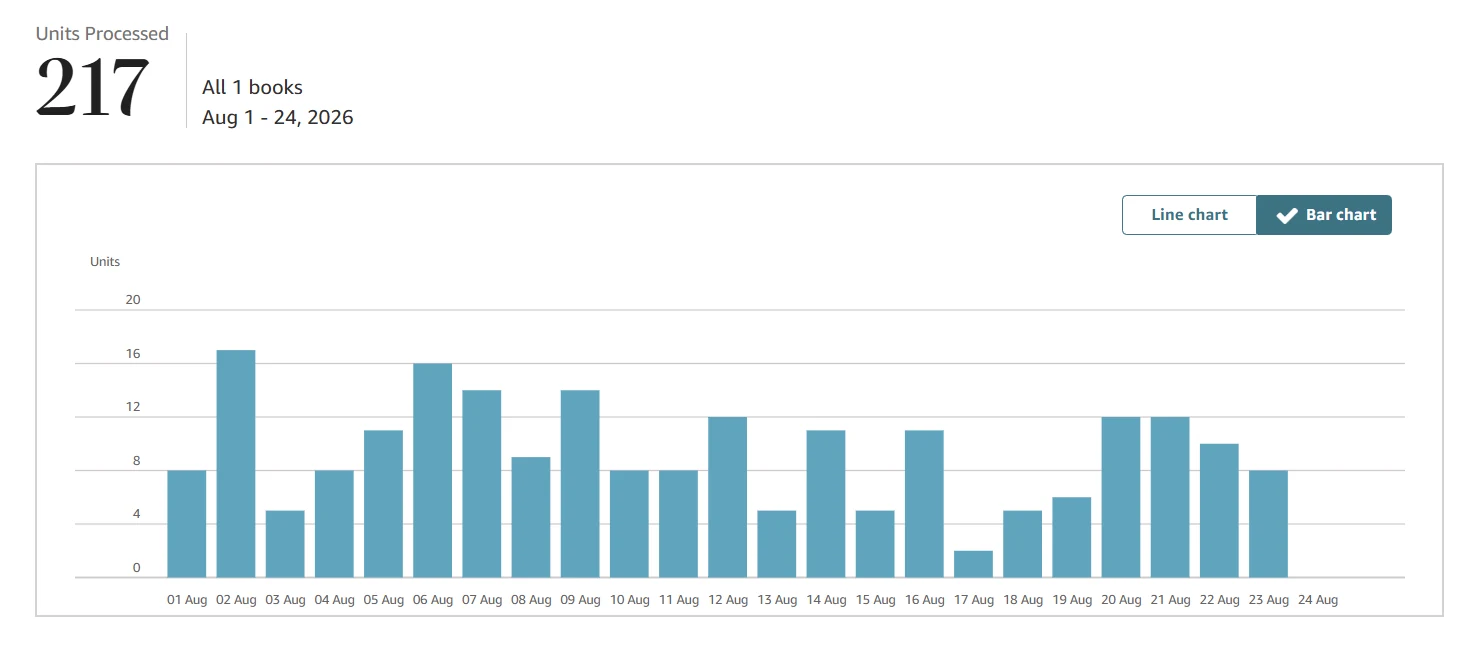
For nine months the chart sat near zero. The niche was fine and the ads were running. In that time we changed the cover about ten times, rewriting the listing and the A+ Content along the way. From May 2026 the book took off and became a category bestseller — 217 copies in the first 24 days of August.
Two takeaways.
Ten covers aren't wasted work. Each one answered "not this." Nine "not this" answers are worth as much as one lucky guess; they're just spread over time.
Change one thing at a time. A new cover, a rewritten description, different keywords and new bids all on one day — and two weeks later you don't know what worked. And if nothing worked, you don't know what didn't.
Before cycling through designs, check one simple thing: is the book getting impressions at all? If nobody sees it, the cover isn't the issue — the funnel breakdown shows which level is broken.
Checklist before you upload to KDP
- The cover is built in the KDP Cover Calculator for the current page count and paper. If either changed after the design, recalculate and redo it.
- One PDF: back, spine and front as one image. At least 300 DPI, CMYK.
- 0.125 in bleed on the top, bottom and outside edges; text at least 0.125 in inside the trim lines.
- Spine text only if the book has 79+ pages (80+ in Cover Creator), with at least 0.0625 in on either side.
- The barcode area in the lower right of the back cover is empty.
- Transparencies flattened, fonts embedded, no crop marks, color bars or template guides.
- No password or file security, no missing pages.
- The Kindle cover is a separate file: JPEG or TIFF, RGB, at least 625 × 1,000 px, under 50 MB.
- The title on the cover matches the listing letter for letter. For print books you only have 72 hours after publishing to fix it.
- No prices or promotions on the cover.
- The cover has been checked as a thumbnail next to competitors, not full screen.
- Last step: KDP's previewer after upload. It shows the cover with the trim lines and catches what you can't see in the file.
FAQ
What size should a KDP book cover be?
There is no single size. A paperback or hardcover cover is a spread of back cover, spine and front cover, and the spine width depends on page count and paper. Enter your trim size, page count and paper into the KDP Cover Calculator to get exact dimensions and a template. A Kindle cover is ideally 1,600 x 2,560 pixels.
What file format does KDP need for a cover?
For paperback and hardcover, one PDF with the back cover, spine and front cover as a single image, at least 300 DPI, up to 650 MB. For Kindle, only the front cover as a JPEG or TIFF in RGB, under 50 MB.
How many pages do you need for spine text on KDP?
At least 79 pages, or 80 if you build the cover in Cover Creator. Keep spine text at least 0.0625 inches from each side of the spine. Thinner books leave the spine as background.
Can I change my book cover after publishing on KDP?
Yes, as many times as you need, and it costs nothing. The paperback title and subtitle, by contrast, can only be edited within 72 hours of publishing, and the trim size and language can't be changed at all.
How much does a KDP book cover cost?
In our experience about $100 for the cover and about $100 for A+ Content in 2026. KDP also has a free Cover Creator that meets the technical specs but is built for simple layouts.
Royalties and ad spend per book, side by side — the way we track our own books. It also shows the highest ACOS each book can afford. Leave your email and we'll send it.
One email a week at most. Unsubscribe in one click.
Real campaign numbers, not theory. One recent case: the same keyword in two match types — broad at 9% ACOS, exact at 49%. In the Facebook group KDP Ads & Profit we break down cases like this every week.
Join the group →or follow Darya on LinkedIn

Selling books on Amazon KDP since 2023, 77,600+ copies sold. Every number in these articles comes from our own KDP and Amazon Ads accounts.
All articles