Getting started
What you can't change after publishing on KDP, and the 72-hour window
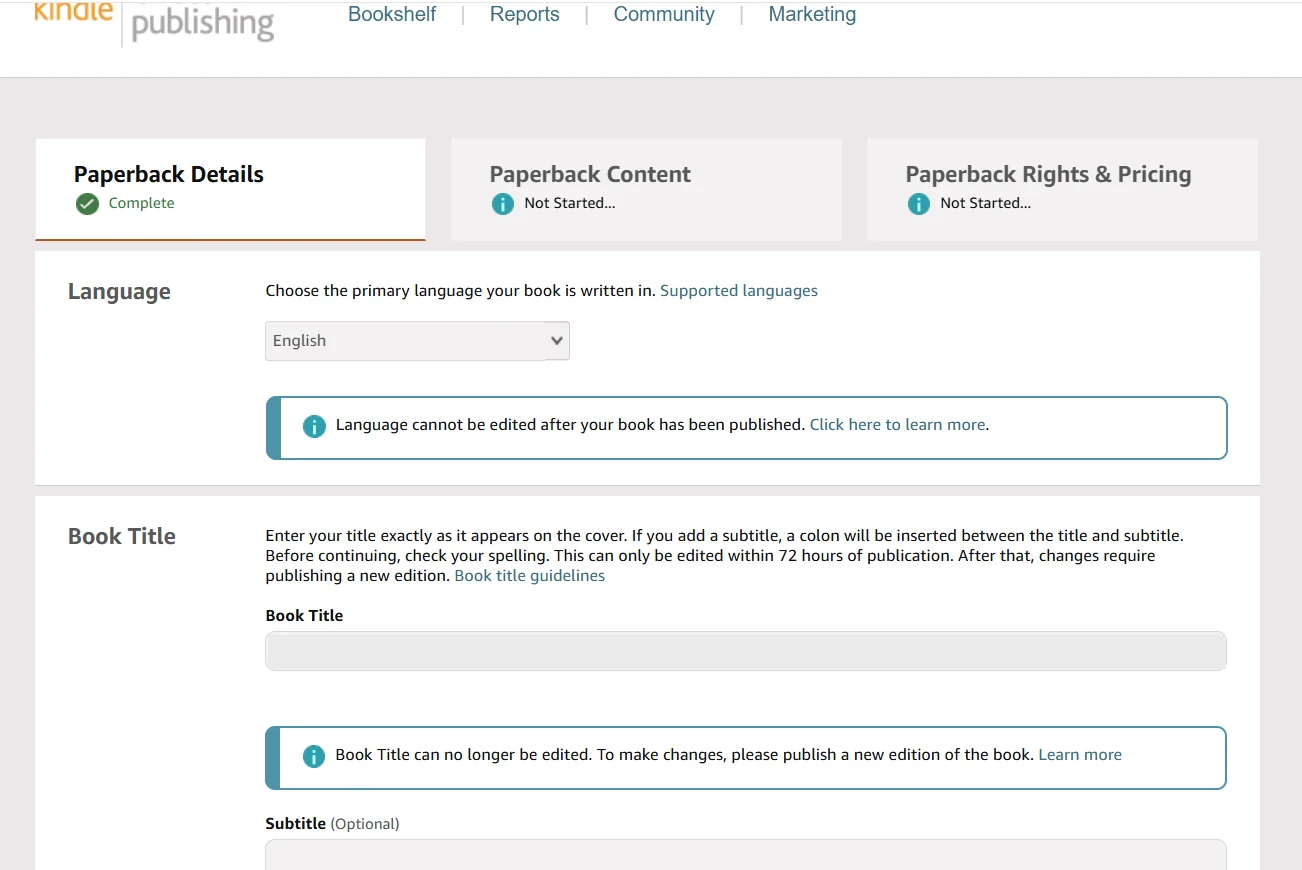 Tap to open full size
After publishing on KDP you can't change a print book's language, trim size, ink type, ISBN, imprint, edition number or royalty rate, and the title, subtitle and author name lock 72 hours after publication. Everything else — cover, description, price, keywords, categories, the interior file — stays editable. Below: the full list for print and Kindle, the 72-hour window, and why "I'll just republish it" doesn't work.
Three cases this article started with
All three happened to authors we work with, and none of them was about inexperience: they knew what they were doing and still got it wrong.
A typo in the author name. One author typed her name in a hurry, and the book simply wasn't published. KDP sent emails asking her to fix it, she resubmitted, and the book was rejected again.
A title that kept getting rejected. Another author submitted her book several times and was turned down each time because of how the title was written.
A color book published as black-and-white. The third made one wrong click in the print settings, and a book full of illustrations went to print in grey smudges.
The first two cost weeks of waiting. The third cost writing a new book. Here's why.
What locks after publishing
KDP lets you edit almost everything: cover, description, price, keywords, categories, the interior file itself.
It even warns you in the publishing form, as the screenshot at the top shows: "Language cannot be edited after your book has been published" and "This can only be edited within 72 hours of publication."
But about ten fields lock forever or almost forever. Those are worth an extra fifteen minutes before you click Publish.
Below: the full list for print books, the list for Kindle (stricter on paper, looser in practice), the language question, and the 72-hour window most authors don't know about.
The full list: paperback and hardcover
According to KDP Help (as of September 2026), this is what you can and can't change for a paperback or hardcover:
| Field | Can you change it? |
|---|---|
| Language | No |
| Book title | Only within 72 hours |
| Subtitle | Only within 72 hours |
| Primary author | Only within 72 hours |
| Edition number | No |
| Publication date | No |
| Trim size | No |
| Low-content checkbox | No |
| Ink and paper type | Only paper switches within black-and-white |
| ISBN and imprint | No |
| Royalty rate | No |
KDP labels this right in the form — here are the subtitle and edition number:

The author name has the same 72-hour window as the title:

And separately, the low-content checkbox. It's used for journals, notebooks and planners, and can't be changed later:

What about Kindle: stricter on paper
A common assumption is that an eBook is easier to edit. KDP Help says the opposite: for a Kindle eBook the language, title, subtitle, edition number and primary author are locked, and the 72-hour window applies only to paperback and hardcover. If you enter an ISBN or imprint when setting up an eBook, KDP warns "you won't be able to complete updates after publishing" to them either.
| Field | Paperback and hardcover | Kindle eBook (per KDP Help) |
|---|---|---|
| Language | No | No |
| Book title | 72 hours | No |
| Subtitle | 72 hours | No |
| Primary author | 72 hours | No |
| Edition number | No | No |
| Trim size | No | Doesn't apply |
| ISBN | No | No, if you entered one |
The account can be looser than the Help page. In our account, the title and subtitle fields of a published eBook are open, and we've changed them after publishing. So our rule: write the title as if you'll never be able to change it, and if you need to change it later, first open the book in your account and see whether the field is open for you.
If the field is closed and it's a typo, KDP support can fix it: KDP Help says support can correct "typos, e.g. misspelling of a name", while "shortening a book title or changing the author name to a pen name" requires publishing a new edition (KDP Help). More on the eBook side: how to sell ebooks on Amazon KDP.
One Kindle setting that used to be treated as permanent no longer is: DRM (Digital Rights Management, the copy lock on Kindle files). KDP now says "You have full control over your DRM settings and can change them at any time", with changes taking 24–72 hours (KDP Help). What changed in 2026 and why it matters is in the eBook article above.
Language: a decision made before the book is written
The first row of both tables is the language, and it's locked everywhere. But there's a bigger point than the lock itself: not every language is available.
KDP has a list of supported languages, and you can only upload a book and its metadata in one of them. Some languages are supported for print only, not for Kindle (KDP Help). KDP is blunt about the eBook side: "eBook content uploaded in an unsupported language won't display properly on Kindle devices and will be removed from sale."
Since the language can't be changed, decide it before you order the text. And not only from the list: English opens the US, UK, Canadian and Australian markets, where there are the most buyers and ads work best. If you publish from outside the US, see Amazon KDP for non-US authors.
The 72-hour window
Few people know about it, and it saves exactly the kind of mistake this article opens with.
For a print book, the title, subtitle and author name can still be fixed within three days of publication. In KDP's words: "you can edit your book's title, subtitle, or primary author name within 72 hours of your title's initial publication date." After that, "these fields are fully locked."
The practical takeaway: the first thing to do after publishing is open your book's page on Amazon and reread the title and author name. Not next week — the same day.
When KDP won't publish your book
The first two cases ended the same way: the book didn't go on sale, and every new attempt meant a few more days of waiting.
The worst part: sometimes KDP tells you exactly what to fix, and sometimes it doesn't. In the second case you get an email saying the book doesn't meet the guidelines, and you have to work it out yourself — changing one field at a time and resubmitting until it passes.
Don't turn this into guessing — there are penalties for that. The standard rejection email we've received warns that if further submissions with similar content that violates the guidelines are found, the account may be terminated or lose access to some KDP services. The rules themselves are in KDP's Content Guidelines.
The key phrase is similar content. The risk isn't in fixing a mistake and resubmitting; it's in sending the same thing again and hoping it passes this time.
So every resubmission should be deliberate: you changed one specific field because you have a reason to think that field is the problem.
The most expensive mistake: ink type
The third case is different, because it can't be fixed at all.
That listing can't be saved. KDP Help is explicit: "After publication, you can't change your ink type between Standard color, Premium color, and black-and-white" (KDP Help). The only change allowed is a paper switch inside black-and-white — for example, moving to the cheaper groundwood paper. Not after 72 hours, not after a year.
That leaves one path: unpublish the book and publish a new one. And a new title now uses one of your two weekly slots per format: KDP rule changes 2026. And here's the costly part: re-uploading the same file with color selected this time won't work. KDP's Guide to Kindle Content Quality lists as disappointing content "Content that is not significantly different from content in another book available in the Kindle Store" and "Content that is rebranded or re-released with significant changes to the metadata, resulting in a confusing reader experience."
Uniqueness is judged by content, not packaging
This is where authors most often go wrong. You can't republish:
- a book that was removed or blocked — not as a new title. The way back is an appeal on the original listing: KDP account terminated or suspended shows how;
- the same book with different print settings — the same text, now in color, is still the same text to Amazon.
Ink type, title and cover are metadata. Uniqueness is judged by what's inside the book, not how it's dressed. Changing the wrapper and keeping the contents doesn't work.
So the new book has to be a genuinely different book: reworked text, different structure, different content. That's no longer a one-click fix:
- do it yourself and you pay in time;
- hire a writer and you pay in money — in our experience about $1,000 for the text alone.
What a book costs from scratch: how much does it cost to self-publish on KDP.
The real cause of all three cases
Publishing late at night, right before bed.
It feels like fifteen minutes: upload the files, click the button. In reality there are about ten fields, and some of them can never be changed.
Publish with a fresh head and give it an hour, not fifteen minutes. It's the cheapest hour of the whole process: a title mistake costs weeks of waiting, and one wrong click in the print settings costs a new book.
A checklist before you click Publish
- Title and subtitle: written out, read again the next day, checked for typos and for the phrases buyers search.
- Author name: exactly as you want it on every future book in the series.
- Language: the one you'll sell in, from KDP's supported list.
- Trim size: matches your competitors and your PDF.
- Ink type: black-and-white or color, chosen on purpose.
- Low-content: ticked only for journals, notebooks and planners.
- ISBN: free KDP ISBN unless you'll sell this edition outside KDP.
- Price: checked against printing cost in our KDP royalty calculator.
The publishing process step by step, field by field: how to publish a book on Amazon KDP. Other mistakes that happen before and after publishing: KDP mistakes beginners make.
FAQ
Can you change the title of a book after publishing on KDP?
For a paperback or hardcover, yes, but only within 72 hours of the first publication date; after that the title, subtitle and author name lock. For a Kindle eBook, KDP Help says the title is locked, although in our account the field stayed open, so check yours. KDP support can fix typos in a title or author name, but not shorten a title or switch to a pen name.
Can I change my book from black and white to color on KDP?
No. KDP does not allow switching ink type between black-and-white, standard color and premium color after publication. You can only switch paper type within black-and-white books. For a color version you need to create a new book.
Can I change the trim size after publishing on KDP?
No. Trim size is locked for paperback and hardcover once the book is published. Check that the size in the settings matches your PDF before you click Publish.
Can I republish a book I unpublished on KDP?
Not the same content. KDP's content quality guide treats content that is not significantly different from a book already in the store, or re-released with changed metadata, as disappointing content. A new edition needs genuinely different content, not just new settings, title or cover.
What can I change after publishing on KDP?
Description, keywords, categories, price, cover, cover finish, bleed and the interior file can be changed at any time. For Kindle eBooks, DRM can now also be changed at any time, with changes taking 24 to 72 hours.
Royalties and ad spend per book, side by side — the way we track our own books. It also shows the highest ACOS each book can afford. Leave your email and we'll send it.
One email a week at most. Unsubscribe in one click.
Real campaign numbers, not theory. One recent case: the same keyword in two match types — broad at 9% ACOS, exact at 49%. In the Facebook group KDP Ads & Profit we break down cases like this every week.
Join the group →or follow Darya on LinkedIn

Selling books on Amazon KDP since 2023, 77,600+ copies sold. Every number in these articles comes from our own KDP and Amazon Ads accounts.
All articles