Getting started
10 KDP mistakes beginners make, and what each one costs
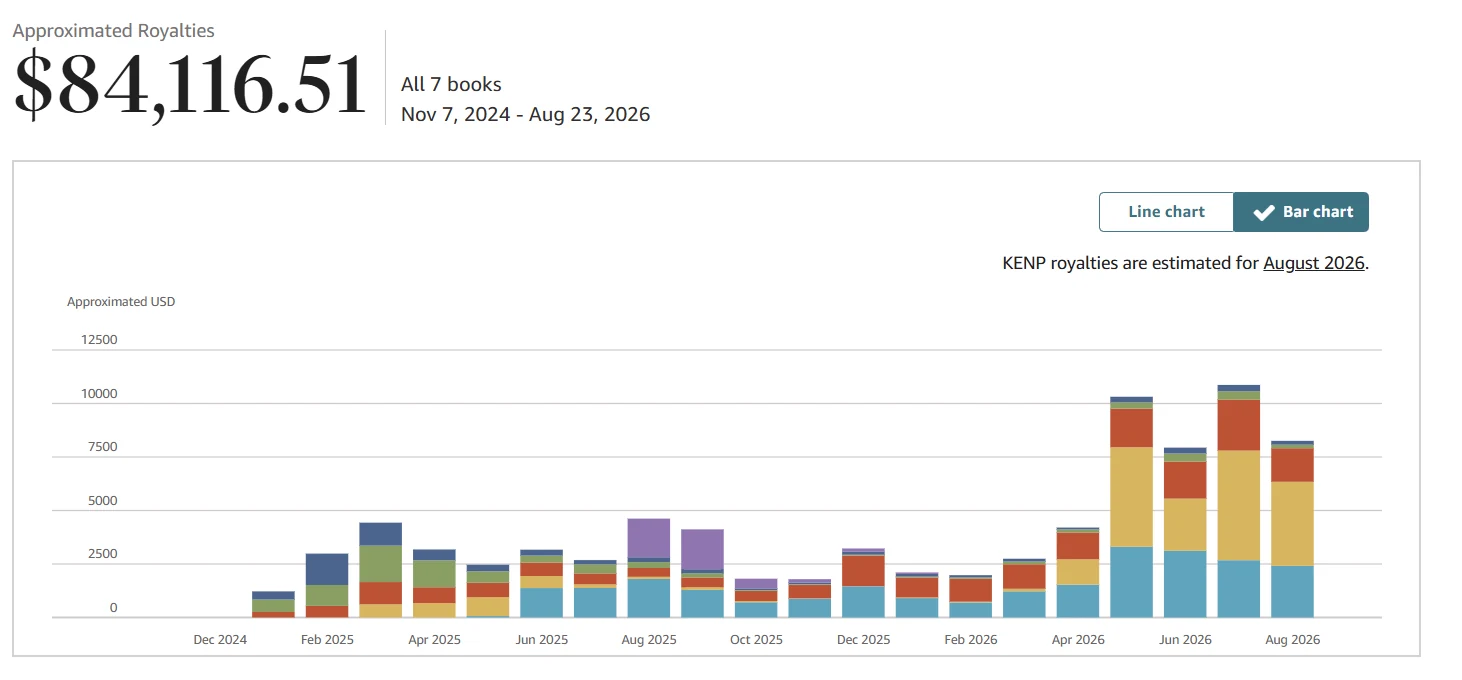
Most self-publishing mistakes on Amazon KDP cost time more than money, and they show up six months later, when fixing them is expensive. Here are the ten we see most often, in the order people make them, from choosing a niche to the first month of ads. Every one comes with numbers from our own accounts or real cases from authors we've worked with.
Mistakes before anything is written
1. Picking a niche at random
The most expensive mistake, because nothing that comes after can fix it.
"The topic seems interesting," "it worked for a friend," "there aren't many books on it" are not criteria. A niche is checked with numbers. When we look at competing books, a Best Sellers Rank under 40,000 tells us people buy in this niche, and under 20,000 tells us a new book has room to climb. A BSR over 100,000 with 0–20 reviews usually means a dead niche.
Look at organic results, not Sponsored ones, and count only independent publishers. If the top is full of big publishers with thousands of reviews, you'll lose on budget, not on quality.
The full checklist is in how to find a profitable KDP niche.
2. Not running the numbers before writing
The second most expensive mistake, and the fastest to avoid: it takes two minutes.
A 200-page full-color book can't be profitable at $15; printing eats everything. You can see that in a royalty calculator before you pay anyone to write it.
Here's what a sound calculation looks like. One of our books: 8.5 x 11 inches, 75 pages, color, $24.99:
| Item | Value |
|---|---|
| List price | $24.99 |
| Printing cost | $4.02 |
| Royalty per copy | $10.98 |
| Break-even ACOS | 44% |
Two minutes, and you know what each copy leaves you and at what ACOS (ad spend as a share of ad-attributed sales) the ads start losing money. The paperback royalty is 60% of the list price at $9.99 and above on Amazon.com, 50% below that, minus printing (KDP Help). You can cross-check any book in Amazon's own royalty calculator.
Our floor is $7.25–10 per copy after printing. If a book can't reach it, change the page count, trim size or price; don't hope ads will make up for it.
3. Planning five books instead of one
"I'll make five, one of them will hit." That logic doesn't work on Amazon.
Five weak books eat the same budget as one strong book, and none of them gets enough ad money to collect reviews and rise in search.
That's only half the problem. Every book has to be fed every month: its own campaign, budget, keywords and reports someone has to read. Five books means five campaigns, five ad budgets and five weekly check-ins, forever.
So you don't get five chances. You get five problems instead of one, each with a fifth of the attention it needs to start selling. (KDP also caps new titles at 2 per format per week, per KDP Help, so the "upload a batch" plan is gone anyway; this and other 2026 changes are in KDP rule changes 2026.)
Our reports show the same thing. Here is the account from the cover, split by each of its seven books:

The last two rows are books we unpublished; we count only the five still on sale.
The best one earned $24,852, the next two $20,715 and $19,670: together about 82% of the account's money among the books still on sale. Then a cliff: $7,983 and $6,399, up to about $500 a month each. That's a fine result too, but the weakest book earns a quarter of the strongest, though each cost the same work.
And those $500 books got there on an account that was already running: working ads, reviews, and someone checking reports every week. A beginner launching five at once won't get even one of them that far.
One more detail from the same table: of seven books, we had to pull two. One because its title was too close to someone else's trademark. The other because of the economics: in six months it made about $200 net, because nobody bought it at $20.99–24.99, and at $18.99 ads took all the profit. Pulling a book like that isn't a defeat. The money and attention went to the three that bring 82% of the result.
One book that hits its niche earns more than five random ones. How much each group actually earns is in how much KDP authors make.
The mistakes that leave a book unsold and an ad budget burned — on our own numbers and failures. Leave your email and we'll send it.
One email a week at most. Unsubscribe in one click.
Mistakes while making the book
4. Saving money on the cover
The most common way people try to save, and the most expensive in its consequences.
The cover decides whether someone clicks your book in search results. Everything else, the text, description, A+ Content, price, works only after that click. No click, and it doesn't matter what's inside.
$200 for a cover and A+ Content together is a benchmark that pays back faster than any other expense. A new cover alone costs about $100, and it can multiply your click-through rate. Get the full wrap dimensions, spine included, from KDP's cover calculator so your designer doesn't redo the file twice.
Checking a cover is easy: shrink it to thumbnail size and look at it from a distance. If you can't read the title or can't tell what the book is about, neither can a buyer, and no ad will fix that. More in KDP book cover.
5. Writing the book for yourself, not for a search
An author writes what interests them and is surprised nobody buys.
The working approach is the reverse: first look at what the existing books are missing.
The most useful place for that is competitors' negative reviews. It's a brief buyers already wrote for you: too few examples, tiny print, filler instead of substance, no index, poor print quality. Your book just has to fix what people complain about.
How to do it. Open five to seven top books in your niche, go to the one- and two-star reviews on each, and list the complaints. In half an hour you'll have a list of repeat complaints. That's your book's outline.
A side effect: you'll also see a niche inside the niche. The topic exists, demand exists, and everyone does it badly. That's the best way in there is.
Mistakes when publishing
6. Publishing carelessly
Sounds silly, but this is where people trip most often. Three real cases from authors we've worked with:
- a typo in the author name: the book simply wasn't published, and Amazon kept emailing to ask for a fix;
- a title that kept getting rejected: several submissions and weeks of waiting;
- a color book published as black and white: one click in the wrong place, and an illustrated book went to print in gray blotches.
None of these was about inexperience. All three knew what they were doing.
The main cause is one: publishing late at night before bed. It feels like fifteen minutes, but there are a dozen fields, and some can't be changed later. Set aside an hour and do it with a fresh head.
One more free habit: the same day the book goes live, open its Amazon page and reread the title and author name as a buyer would. That's when the 72-hour window to fix them is still open.
7. Not double-checking what can't be changed later
KDP lets you edit almost everything: cover, description, price, keywords, the manuscript file.
But not everything. For paperbacks and hardcovers, KDP Help lists as locked after publishing the language, title, subtitle, edition number, primary author, publication date, low-content checkbox, ISBN choice, imprint, trim size and royalty rate (KDP Help). The title, subtitle and primary author can still be edited "within 72 hours of your title's initial publication date, after it is no longer In Review." That's a rescue window most people don't know about. After it, a plain typo in the title or author name can still be fixed by asking KDP Support (KDP Help); anything bigger means a new edition.
The most expensive case is ink type. KDP Help says ink and paper type can be changed after publishing only "for specific paper type switches on black and white ink titles only." A color book published as black and white can't just be switched. It needs a new edition, which starts from zero: no reviews, no ranking, no ad history.
And while you're in the form: if any text, images or translation were created by an AI tool, KDP requires you to say so when you publish (Content Guidelines). Using AI only to edit or error-check your own writing doesn't need disclosure.
The full list of locked fields and what to do if KDP rejects a book is in what you can't change after publishing.
Half of these mistakes wouldn't happen if the form were filled in once, in order. How it works field by field is in how to publish a book on Amazon KDP.
Mistakes after publishing
8. Treating publishing as the finish line
The most common mistake of all, and the most expensive in lost money.
Look at the chart at the top of this article. For a year and a half the account ran on autopilot: books published, ads running on low bids, nobody touching anything. $1,000–2,500 a month. Then we started managing it, and May brought almost $10,000.
The books were the same the whole time. Not one new page, not one new cover. The only difference is that the account started being managed.
Here's what was actually done:
- Keywords were cleaned up. We paused the ones with spend and no orders and added terms from the search term report. How that works is in Amazon KDP keywords.
- Bids went up where the book was losing the auction. On low bids it never reached the top of search, so it got no clicks. Where your ads show and how to bid for it: Amazon Ads placements and bidding strategy.
- Losing campaigns were cut. Account-wide ACOS can look fine while one campaign runs at 60%; here's how to find it.
- Listings were fixed where the description and A+ Content didn't match what people searched for.
No magic. Four things, looked at every day, with each change judged no sooner than 7 days later, and the account moved to a different level.
Publishing is the start, not the finish. The costly mistake here isn't doing something wrong. It's doing nothing.
9. Running ads for three days and drawing conclusions
The classic: launch, spend $10, no sales, switch off.
Amazon Ads is an auction: whoever pays more per click shows higher. On minimum bids your book ends up at the bottom of the results. Here's how that looks in a report:

A hundred impressions and two clicks don't mean "ads don't work." They mean there's no data to decide anything.
The minimum for a campaign to collect usable data, in our experience, is $15–20 a day and two weeks without big changes. Daily bid swings are worse than any bid: the algorithm never gets to learn who to show the book to.
And separately: KDP pays about 60 days after the end of the month of the sale (KDP Help), so it's about three months from publishing to the first payment, while ads are billed right away. That's why we budget ads three months ahead; the math is in how much it costs to self-publish on KDP.
10. Changing everything at once
No sales, so in one day someone changes the cover, rewrites the description, swaps the keywords and raises the bids.
Two weeks later sales changed, and nobody knows what worked. Or they didn't change, and nobody knows what failed. Two weeks spent, nothing learned.
The right order: find the stage where you lose the buyer and fix only that.
| What the report shows | Where the problem is |
|---|---|
| Few impressions | niche, keywords, bid |
| Impressions but no clicks | cover, title, price |
| Clicks but no sales | listing, A+ Content, reviews |
| Sales but no profit | ACOS above break-even |
To see royalties and ad spend for the same book side by side, start with what the KDP sales dashboard shows.
The rule is simple: one stage, two weeks, one conclusion. Slower than you'd like, but in two months you know your book instead of a pile of guesses.
The full walkthrough with numbers is in why is my book not selling on Amazon.
Finding that stage is easier with the whole picture than with the Amazon Ads console alone, which sees only ads, one marketplace at a time. We use AuthorLens, an analytics dashboard made only for Amazon KDP. We use AuthorLens daily and have a business relationship with it. It puts royalties, ad spend, organic vs ad sales and the book's daily ranking for each keyword side by side, so you can see where the book rose and where it slipped, and decide from numbers instead of guesses.
What really matters here
If you remember two of the ten, make it these. And if you're still deciding whether to start at all, read KDP pros and cons first.
First: do the math before, not after. Niche, book economics, three months of ad budget: all of it takes half an hour before the first dollar is spent. After publishing, every mistake costs many times more.
Second: a book doesn't sell itself. Publishing is a tenth of the work. The other nine tenths are ads, reviews, keywords and checking the numbers regularly. That's the difference between $2,000 and $10,000 a month on the same account with the same books.
Notice how the ten are distributed: three happen before the first line is written, and seven before the book goes live. That's the real takeaway. Most of the money in this business isn't lost in the work; it's lost in decisions made in the half hour before it.
FAQ
What is the most expensive KDP mistake?
Picking a niche at random. No cover or ad budget fixes it: if nobody searches for the book, or the niche is full of big publishers with thousands of reviews, every extra dollar just shows a weak product to more people faster.
How many books should a beginner publish on KDP?
One. Five weak books eat the same budget as one strong one, and none gets enough ad money to earn reviews and rankings. Each book also needs its own campaign, budget and reports every month. KDP now also limits new titles to 2 per format per week.
How long should I run Amazon ads before judging a book?
At least two weeks, better a month, at around $15 to $20 a day without big changes. Less than that isn't enough data. Changing bids every day is one of the most common mistakes: the algorithm never gets to learn who to show the book to.
I made a mistake in my book title on KDP. Can I fix it?
For paperbacks and hardcovers, KDP lets you edit the title, subtitle and primary author within 72 hours of initial publication, once the book is no longer In Review. After that these fields lock. A simple typo can still be corrected by KDP Support; any other change needs a new edition.
What can't you change after publishing on KDP?
For print books, KDP Help lists the language, title, subtitle, edition number, primary author, publication date, low-content checkbox, ISBN choice, imprint, trim size and royalty rate. Ink and paper type can only be changed for certain paper switches on black-and-white books. The cover, description, price, keywords, categories and manuscript can be updated any time.
My book is published but not selling. What should I do?
Don't change everything at once. Find the stage where you lose buyers: few impressions points to the niche, keywords or bids; impressions without clicks to the cover, title or price; clicks without sales to the listing and reviews. Fix one stage at a time and give each change two weeks.
Royalties and ad spend per book, side by side — the way we track our own books. It also shows the highest ACOS each book can afford. Leave your email and we'll send it.
One email a week at most. Unsubscribe in one click.
Real campaign numbers, not theory. One recent case: the same keyword in two match types — broad at 9% ACOS, exact at 49%. In the Facebook group KDP Ads & Profit we break down cases like this every week.
Join the group →or follow Darya on LinkedIn

Selling books on Amazon KDP since 2023, 77,600+ copies sold. Every number in these articles comes from our own KDP and Amazon Ads accounts.
All articles