Profit & analytics
KDP sales dashboard: what it shows, and the number it hides
The KDP sales dashboard shows your orders, estimated royalties and Kindle Unlimited page reads — but not a single dollar of ad spend. So it can't tell you what you actually earned. Below: what each KDP report shows, what it hides, and how to see real profit per book, using our own December 2025 numbers.
What the KDP Reports dashboard shows
The dashboard lives in Reports → Dashboard in your KDP account, or at kdpreports.amazon.com. According to KDP Help (as of September 2026), it tracks four things:
- top-earning books;
- estimated royalties;
- orders;
- KENP reads — Kindle Unlimited pages read.
You can filter by day and month, see your top formats and marketplaces, and follow a 30-day trendline of orders and page reads.
Next to it sit the other KDP reports. None of them is "the" sales report — each answers its own question, and each has its own delay:
| Report | What it answers | When the data arrives |
|---|---|---|
| Dashboard | How am I doing today? | Every 15 minutes |
| Orders | How many copies sold, by book and format | Up to 24 hours for eBooks, up to 14 days for print |
| KENP Read | How many Kindle Unlimited pages were read | Final near the 15th of next month |
| Royalties Estimator | How much I earned, in one currency | 24–48 hours |
| Prior Months' Royalties | What I earned last month, officially | Near the 15th of every month |
| Payments | What Amazon actually paid | 60 days after the end of the month of sale |
| Month-to-Date | Units and KENP for the current or prior month, by transaction | As orders are processed: eBooks once paid, print once shipped |
| Pre-orders | Pre-orders for upcoming books | Every 15 minutes |
| Promotions | Kindle Countdown Deals results | Every 15 minutes |
Source: KDP Reports, as of September 2026.
Three details that explain most "why don't the numbers match" questions:
- Time zones. Orders are counted in the time zone of the marketplace (GMT for Amazon.co.uk), while Kindle Unlimited pages are counted in UTC. A sale late in the evening in the US can land on a different day in different reports.
- Expanded Distribution sales reach the Payments report about 90 days after the end of the month following the sale.
- Downloads. Every report can be downloaded except Promotions and Month-to-Date. For your own spreadsheet, Prior Months' Royalties is the one to download: it's the official monthly total, converted at the exchange rate of the month's last day.
One practical warning from KDP itself: "The data in the Today tab in the Dashboard may not match with the Orders, Royalties Estimator, KENP Reads, old and downloadable reports." The other reports lag behind. If today's numbers look off, give them a day before you panic.
Seven numbers in Amazon Ads that show whether the ads are earning or just running. Leave your email and we'll send it.
One email a week at most. Unsubscribe in one click.
The number it hides: your ad spend
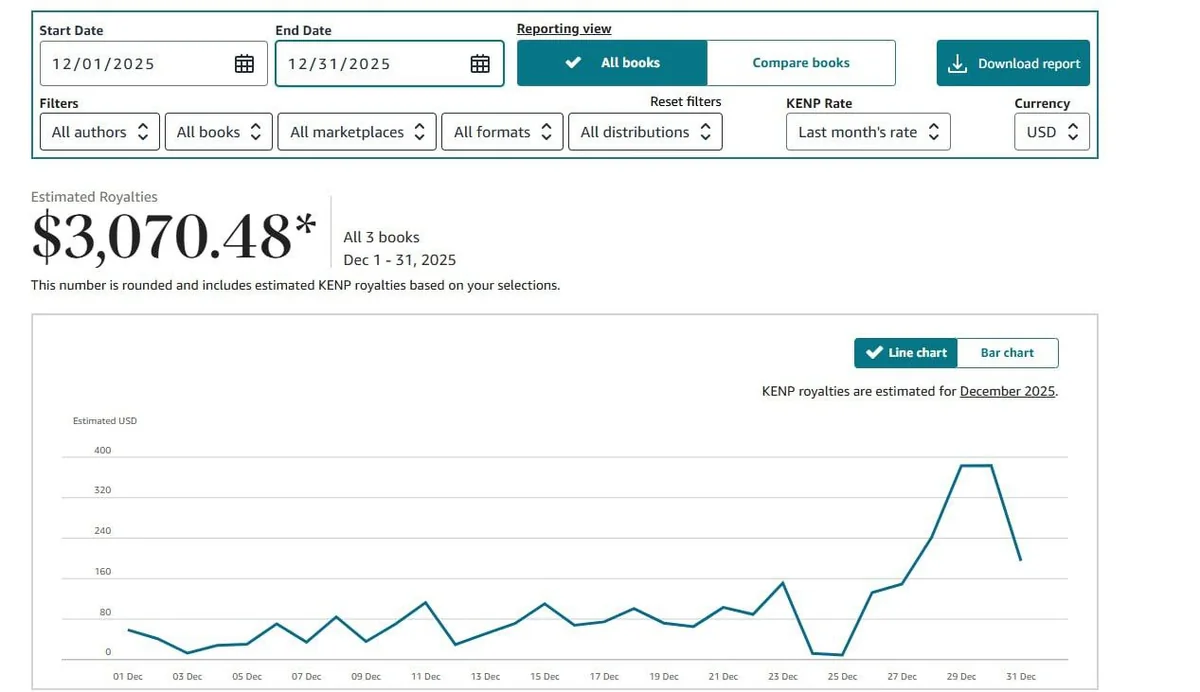
Here is our own report for one account, December 2025. The Royalties Estimator says $3,070.48. A good month.
Now the same month in Amazon Ads:

$1,510.64 on ads. So the real result for December is $3,070.48 − $1,510.64 = $1,559.84. The KDP dashboard never shows that number, because KDP does not know what you spent on Amazon Ads. Every KDP report in the table above leaves ad spend out. Amazon Ads, for its part, only sees the sales it attributes to ads — KDP itself says a gap between the two accounts is normal (KDP Help on book advertising, as of September 2026).
And look at the ACOS: 22.13%. By most rules of thumb that is excellent. Yet ads took 49% of everything KDP paid that month: $1,510.64 ÷ $3,070.48 = 0.49.
Both numbers are true. ACOS divides ad spend by ad-attributed sales at list price — the price the buyer pays, before Amazon takes its share and before printing costs. Your royalty is a fraction of that. An 8.5×11-inch, 75-page color paperback at $24.99 with a $4.02 printing cost ($1.00 + 75 × $0.0402 = $4.015 before rounding) earns you 60% × $24.99 − $4.015 ≈ $10.98, not $24.99. So a "cheap" ACOS can still eat half of your real income. How royalties work for every format is in KDP royalties explained.
This is why we judge campaigns by profit, not by ACOS — the full method is in Amazon Ads for authors: judge campaigns by profit, not ACOS. The threshold where ads stop paying off depends on your own royalty per copy; you can check yours in our free KDP royalty and break-even ACOS calculator.
Three more things neither dashboard tells you
Organic vs ad sales. KDP counts every order but doesn't know which came from an ad. Amazon Ads counts the orders it attributes to ads but doesn't see the rest. Per book, nobody splits the two for you. It matters: on one of our books from September 1 to 24, 2026, 35 of 76 copies sold with no ad at all. Judge that book by its ACOS alone and you'd underrate the ads that pushed it up in search. How to count it yourself: organic vs ad sales on KDP.
Video and brand ads per book. Amazon reports Sponsored Brands and video campaigns without tying the spend to a specific book. On our account, one video campaign looked fine in the console — $128.74 spent, $206.91 in sales. But $206.91 is the list price; the royalty on those sales was $79.39. The campaign lost $128.74 − $79.39 = $49.35. Whether video ads pay off for books at all: video ads for books.
Royalties are estimates. KDP Help is explicit: the exchange rate at the time of payment will be different, so the Royalties Estimator "won't exactly match what you're paid", and the Kindle Unlimited estimate made before the monthly KDP Select Global Fund is announced "won't match your actual earnings". The exact amount only shows up in Prior Months' Royalties and Payments, about two months later.
How to see profit per book yourself
You can do it with two exports and a spreadsheet. It takes about an hour a month once the sheet is set up.
- KDP: open Reports → Royalties Estimator, choose the month, set one currency, and click Download report. You get royalties by book and format.
- Amazon Ads: open Measurement & Reporting → Reporting, set the same dates, and export a campaign report with spend.
- Match campaigns to books. Easy if each campaign advertises one book. Sponsored Brands and video campaigns often promote several — split their spend by the books Amazon reports as sold.
- Subtract ad spend from royalties for each book.
- Check the month again after the 15th, when Kindle Unlimited reads are final.
Three traps:
- Ad sales keep coming in. Amazon credits an ad with purchases made within 14 days of the click, and orders can take up to 12 hours to reach Amazon Ads reports (KDP Help). The last two weeks will still move.
- Currency. If you sell in several marketplaces, convert everything to one currency before subtracting.
- Legacy Amazon Ads reports are retiring. Amazon retires the Sponsored ads reports pages by December 31, 2026. Unified reporting keeps up to 15 months of daily data and up to 6 years of monthly data, and it uses a different attribution method, so numbers may not match your old reports (Amazon Ads, as of September 2026). If you want day-level history beyond that, keep your own exports. Everything else that changed this year is in KDP rule changes in 2026.
The shortcut: a dashboard with profit in it
If the spreadsheet sounds like a chore you'll skip in February, this is what AuthorLens does. It is an analytics dashboard made only for Amazon KDP. We use AuthorLens daily and have a business relationship with it.
It pulls ad data through the official Amazon Ads API and royalties through the AuthorLens Sync browser extension, which reads the same KDP reports you see. After you connect, the last three months arrive within minutes; a full twelve months takes longer. For now it only reads — it doesn't change your bids or campaigns, so you apply the fixes in Amazon Ads yourself. One-click fixes and an autopilot mode are coming soon, as options you choose.


The Change column sits right in the table: for every book you see at once whether it grew or dropped against the previous period. In July, Book 1 gained $696.67, Book 3 $630.92, and Book 2 lost $209.45. Set the period to Yesterday and every morning you see which books are growing and which are slipping. Just keep in mind that paperback sales arrive within 14 days, so yesterday’s paperback numbers will still grow.
What you see that neither Amazon dashboard shows:
- net profit per book and marketplace — royalties minus ads, including video and brand ads assigned to the books they sold;
- organic vs ad sales by book, format and day, plus TACoS (ad spend as a share of all royalties);
- Ad Coach — a to-do list for your campaigns with its estimate of the dollar impact of each fix;
- keyword rankings every day for up to 500 keywords;
- a Telegram report every morning, plus alerts the moment something happens: ad spend for the day passed your limit — $100, $200, $500 or any amount you choose — or Amazon blocked a book or rejected an ad.


It costs $39.99 a month or $32.99 a month billed yearly; the price is planned to rise.
Where it's weaker:
- Amazon only — it won't count Kobo, Apple Books or your own store;
- read-only for now — no one-click apply or autopilot yet, so you make Ad Coach's changes yourself;
- no free trial yet, and history from another tracker can't be imported.
If you sell on several stores, Publisher Champ does profit tracking well across all of them ($16.99, $21.99 or $29.99 a month), but it won't tell you what to change in your Amazon ads. We don't recommend Book Report or ScribeCount: Book Report imports only Sponsored Products and only for the last 90 days (its documentation), and Kindlepreneur stopped recommending ScribeCount in May 2026 over reliability problems. All four side by side: Publisher Champ vs Book Report vs ScribeCount. Every screen with screenshots: our AuthorLens review. All 16 tools: best KDP tools.
Which dashboard do you need?
One book, no ads. The free KDP dashboard is enough. Check Prior Months' Royalties and Payments for exact numbers.
Running Amazon Ads. You need profit, not royalties: either the monthly spreadsheet above or a tool that combines KDP and Amazon Ads. If the ads don't pay off, start with placement bids and ad keywords.
Selling on several stores. A multi-store tracker for the totals, plus something that shows your Amazon ads by profit.
FAQ
Where are KDP Reports and the KDP dashboard?
Log in to kdp.amazon.com and open the Reports tab. The Dashboard is the first report there; Orders, KENP Read, Royalties Estimator and Payments are in the menu on the left.
How often does the KDP dashboard update?
According to KDP Help, the Dashboard is updated every 15 minutes. eBook orders appear within 24 hours, print orders within 24 hours after they ship, so paperback sales reach the reports within 14 days, and Kindle Unlimited page reads are finalized near the 15th of the following month.
Why doesn't the dashboard match what KDP pays me?
The dashboard shows estimated royalties. Exchange rates and the monthly KENP rate change before payment, and KDP pays 60 days after the end of the month of sale (for Expanded Distribution, about 90 days after the end of the following month). For exact amounts, KDP points to the Prior Months' Royalties and Payments reports.
Does KDP show my Amazon Ads spend?
No. None of the KDP reports include ad spend. Ad spend lives in Amazon Ads, so profit per book means combining the two by hand — or using a tool that pulls both, such as AuthorLens.
How long does Amazon Ads keep report data?
Amazon retires the legacy Sponsored ads reports pages by December 31, 2026. Unified reporting (Measurement & Reporting → Reporting) keeps up to 15 months of daily data and up to 6 years of monthly data. For longer day-level history, keep your own exports or use an analytics tool.
Is there a free way to track KDP profit?
Yes: export royalties by book from the Royalties Estimator, export campaign spend from Amazon Ads, match campaigns to books and subtract. To check what a single copy earns and your break-even ACOS, use our free KDP royalty calculator.
Royalties and ad spend per book, side by side — the way we track our own books. It also shows the highest ACOS each book can afford. Leave your email and we'll send it.
One email a week at most. Unsubscribe in one click.
Real campaign numbers, not theory. One recent case: the same keyword in two match types — broad at 9% ACOS, exact at 49%. In the Facebook group KDP Ads & Profit we break down cases like this every week.
Join the group →or follow Darya on LinkedIn

Selling books on Amazon KDP since 2023, 77,600+ copies sold. Every number in these articles comes from our own KDP and Amazon Ads accounts.
All articles