Amazon Ads
Amazon Ads placements and bidding strategy: when bid adjustments burn your budget
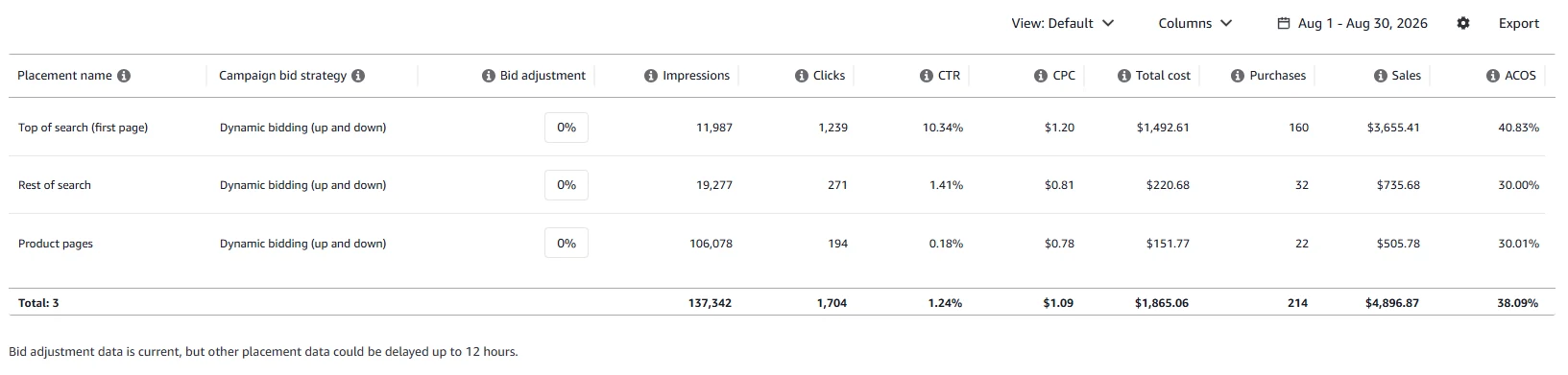
Every Sponsored Products campaign runs in three placements — top of search, rest of search and product pages — and Amazon lets you boost your bid in each by up to 900%. Those boosts stack on top of your bidding strategy, so a $1 bid with a 50% top of search boost and dynamic bids up and down can reach $3. Below: how to read the placement report, which bidding strategy to use, and what happened when we boosted top of search on a falling campaign.
Three markets inside one campaign
Amazon Ads shows a Sponsored Products ad in three places on Amazon, and the placement report lists each one as its own row:
- Top of search (first page) — according to Amazon Ads help, up to the first 5 positions in the top row of first-page results on desktop and up to the first 4 on mobile. The most expensive spot;
- Rest of search — the middle and bottom of the results page, plus page two and beyond;
- Product pages — ads on other books' detail pages, plus non-search spots such as the add-to-cart page.
These are not three shades of the same thing. Someone at the top of search is choosing what to buy and is in a buying mood. Someone on a product page has already picked a book and is browsing around it. So product page clicks are cheaper, there are more of them, and fewer of them turn into orders.
To see the report, open a campaign in the Amazon Ads console and switch to the Placements tab.
What we look at in our own accounts when a campaign spends more than it brings in — and in what order. Leave your email and we'll send it.
One email a week at most. Unsubscribe in one click.
What to look at in the placement report
Not spend. Spend tells you where the money went, not whether it paid off.
Look at conversion: orders per 100 clicks in each placement. In our experience, around 10 orders per 100 clicks is a healthy starting benchmark for a book. But the benchmark only matters at the very start, to get a sense of scale. After that, compare each placement to the other two and to itself before a change. If one placement brings lots of clicks and converts clearly worse than the rest, that's where your budget leaks.
The second number is ACOS for each placement separately (ACOS is ad spend as a share of ad-attributed sales). The campaign's total ACOS can look fine while, inside it, search makes money and product pages drag it down.
What the table does not show, and never will: what you kept. ACOS compares ad sales to ad spend at list price. It knows nothing about organic sales, and Amazon doesn't show royalties minus ad spend per book anywhere. We track that in AuthorLens, an analytics dashboard made only for Amazon KDP: net profit per book and marketplace after ads, plus organic vs ad sales.
We use AuthorLens daily and have a business relationship with it.
For the math behind "is this ACOS too high for my book", see Amazon Ads for authors: profit, not ACOS.
Placement bid adjustments and bidding strategy
Amazon lets you raise your bid for a specific placement by a percentage — up to 900% for top of search, rest of search and product pages (Amazon Ads, January 2024). A 50% adjustment on top of search makes your bid 1.5 times higher, and only for the top of search. Everywhere else the bid stays as it was.
Note that the percentage moves your bid — your ceiling — not the price of a click. What you actually pay is decided by the auction. In our July report, a click cost $1.21 at the top of search, $0.92 in rest of search and $0.93 on product pages. The top spots are more expensive on their own, with no adjustment at all, simply because more advertisers compete for them.
Now the part where budgets burn. Every campaign also has a bidding strategy. You pick it when you create the campaign and can change it later. The three options, as the Amazon Ads author's guide describes them:
| Strategy | What Amazon does with your bid |
|---|---|
| Dynamic bids — down only | "Amazon Ads will reduce your bid if your ad is less relevant to the shopping query or is on a placement that doesn't perform well." |
| Dynamic bids — up and down | Raises your bid for auctions more likely to convert and lowers it for the rest. Amazon's dynamic bidding guide says bids can go up "by up to 100% for all placements". |
| Fixed bids | "Amazon Ads uses your exact bid for all opportunities and won't adjust it." |
The key sentence is in Amazon's own help page on bid adjustments (updated September 23, 2026): the placement increase "works in addition to your selected bidding strategy". And Amazon gives the example itself: a $1 dynamic bid with a 50% top of search adjustment becomes $1.50, and "Dynamic bidding (up and down) can further increase the bid up to $3."
So the two increases stack. You meant to pay up to $1.50 for the top of search; with up and down you've authorized up to $3.
On our account, new campaigns came with up and down already selected, and most authors never look at that setting again: it's chosen once at setup and never shows up on the main campaign screen. Check what your campaigns use.
So the rule is simple. If a campaign runs on up and down, don't add placement adjustments — not even for top of search. If you want to steer placements with percentages, switch the campaign to down only first. There, the percentage works exactly as you set it.
Where to find both settings. Both are visible on the same Placements tab (screenshots below). The strategy is the Campaign bid strategy column, second from the left; ours said "Dynamic bidding (up and down)". The percentages are the Bid adjustment column: the white boxes showing 0% are where you type them. To change the strategy, go to Campaign settings → Campaign bidding strategy.
What happens when you add adjustments to a falling campaign
The mistake looks logical: sales dropped, so we must be showing less, so let's buy a higher position. Impressions do go up. Clicks go up. Sales don't. Placement adjustments buy visibility, not demand: a higher position simply brings more people who won't buy.
Here's how it went for us. Same campaign, July and August 2026. In July there were no placement adjustments at all. In August sales started to slide, and we added a top of search adjustment to pull them back up.


| July | August | |
|---|---|---|
| Impressions | 108,236 | 133,538 |
| Clicks | 1,494 | 1,684 |
| Spend | $1,663.81 | $1,843.61 |
| Orders | 251 | 207 |
| ACOS | 28.83% | 38.93% |
Impressions up 23%, clicks up 13%, $180 more spent. And 44 fewer orders.
The Placements tab for the same two months shows where the difference went.


- Top of search — impressions up from 8,141 to 11,987, clicks from 997 to 1,239, but orders down from 178 to 160. ACOS here went from 29.48% to 40.83%;
- Product pages — impressions up from 68,746 to 106,078, more than 1.5 times, for 22 orders;
- Rest of search — the only placement that got quieter: 19,277 impressions instead of 31,147.
The totals in the two reports differ slightly. The screenshots were taken at different times, ads run continuously, and Amazon removes invalid traffic after the fact. Hence a rule: compare numbers within one report, not across reports.
A warning about the Bid adjustment column. Both screenshots show 0% in it. For July that's true: there were no adjustments. But the August report also shows 0%, although the adjustment was on all month. At the bottom of the page Amazon says so plainly: "Bid adjustment data is current". The column shows what is set now, not what was set during the selected dates. You can't reconstruct your change history from this report, so keep a log yourself: date, what you changed, why.
So the adjustment moved us up in search and brought traffic — worse traffic. Conversion fell from about 17% to about 12%. Next we did what seemed logical: we watched ACOS and net profit and lowered bids. It didn't help: spend slowed, orders didn't come back. We were treating the wrong thing. The problem wasn't the price of a click; it was where the clicks came from.
We don't rule out seasonality: August is quieter than July in our niche. But look at the exact placement we changed: 1,239 clicks at the top of search instead of 997, and 160 orders instead of 178. More paid traffic in the most expensive spot, and fewer sales from it. Seasonality doesn't work like that.
Placement adjustments bring back impressions, not sales.
Here is the same account after we removed the adjustment.

The screenshot was taken on August 30 at 11:49 pm; we removed the adjustment earlier that day. ACOS on keywords with sales stayed between 13% and 25%. That's one day and one campaign — an illustration, not proof. Judge a change like this over a week.
One more switch on the same screen: off-Amazon ads
In Campaign settings, right below the placement percentages, there's a block called Adjust reach on and off Amazon. It decides whether your Sponsored Products ads can run outside Amazon.

There are two options. Amazon Ads help (updated September 23, 2026) describes them like this:
- Increase reach off-Amazon (default) — "Delivers ads both on and off Amazon using your existing targeting settings". This is the default;
- Limit reach to Amazon — "Ads appear only on Amazon owned-and-operated properties. This may reduce impressions and sales opportunities."
Where off-Amazon ads go: third-party sites and apps, and content by creators in the Amazon Influencer and Associates programs. Clicks lead to your book's product page. As of September 2026, off-Amazon Sponsored Products run in Brazil, Canada, Egypt, France, Germany, India, Italy, Mexico, Saudi Arabia, Spain, Türkiye, the UAE, the UK and the US.
Now the part that belongs in an article about placements. The same help page says:
- "Your maximum bid applies to every click, whether on or off Amazon, and every click counts toward the same campaign budget."
- "Bid adjustments for Top of Search, Rest of Search, and Product Pages do not apply to off-Amazon placements. Dynamic bidding and rule-based bidding still apply."
Put that next to the previous section. Outside Amazon, your three placement boxes do nothing — but up and down can still raise your bid. The only lever you have for placements simply doesn't exist there.
One more thing you don't expect. Where there's no search at all — in a feed, on a content site — there's no query, so Amazon makes one up. In its targeting help Amazon says that when a customer search term isn't available, it "will infer a search term from the context that best matches your keywords". In our experience these inferred terms show up in the search term report next to real ones, and you can add the irrelevant ones to negative keywords like any other.
What to do: open Campaign settings and choose "Limit reach to Amazon". The default decides for you. This is one of several Amazon Ads changes this year; the full list is in KDP rule changes 2026. We'd rather pay for people who walked into a bookstore than for people who saw a book between two posts. Amazon warns that impressions will drop — they should: you were paying for them, and your placement settings didn't apply there.
If you keep off-Amazon ads on, read them as a separate row in the placement report, not as part of the total. Amazon lists off-Amazon results in the Placement report under Measuring and Reporting.
What to do instead of placement adjustments
If adjustments are already set, reset them first. Put 0% on every placement and don't touch anything else for a week. This doesn't count as a new change: you're undoing one.
Then clean up. Open the search term report for the last two months and see what searches your ad actually showed for. Anything that isn't about your book goes into negative keywords. It's the one action that works right away and costs nothing. More on that in our guide to KDP keywords and cleaning up ad keywords.
Then do the arithmetic. Work out the break-even ACOS for your book. You may find the campaign you wanted to fix is doing fine, and the scary number only looks scary next to someone's "keep it under 30%" advice.
Only then, placements. Once the junk searches are gone and you know your threshold, the placement table starts telling the truth: you can see where the book really sells.
And most important: one change at a time, then a quiet week. Amazon doesn't recalculate delivery instantly. If you change a percentage, a bid and keywords at once, a week later you won't know which one worked.
Where this stops working by hand
Everything above is about one campaign, and one campaign you can fix by hand. It gets harder when you have several books with three or four campaigns each. Then the question is no longer "which percentage", but how to structure campaigns so they can grow and you can still tell where the money came from. The placement report doesn't answer that.
That's where per-book numbers matter more than per-campaign ones: royalties minus all ad spend for each book, organic vs ad sales, and TACoS (ad spend as a share of total sales, organic included). What to do: once you run more than one book, check royalties minus all ad spend per book every week. How big the organic share gets on our books: organic vs ad sales on KDP. If a book isn't selling at all, start one step earlier, with why a book is not selling on Amazon.
Don't want to deal with ads yourself? Campaign setup and ongoing management can be handed to an ads specialist we trust — message him on Telegram @Lamgr_557359.
FAQ
What are placements in Amazon Ads?
Placements are where a Sponsored Products ad appears: top of search (the first row of first-page results), rest of search (the rest of the results and later pages) and product pages (other products' detail pages and non-search spots). The Placements tab inside each campaign shows clicks, orders and ACOS for each one.
What is the difference between dynamic bids down only and up and down?
With down only, Amazon can only lower your bid when a click looks less likely to convert. With up and down, Amazon can also raise it, by up to 100% according to Amazon's dynamic bidding guide. Fixed bids use your exact bid every time.
Do placement bid adjustments stack with dynamic bidding?
Yes. Amazon Ads help says the placement increase works in addition to your bidding strategy. Its own example: a $1 bid with a 50% top of search adjustment becomes $1.50, and dynamic bidding up and down can raise it further, up to $3.
What percentage should I set for top of search?
There is no universal number, and the first question isn't the number. Check the bidding strategy first: on up and down, we don't set placement adjustments at all. On down only, make sure top of search converts better than the other placements, then raise it in small steps, one change at a time.
Should I turn off off-Amazon ads in Sponsored Products?
Off-Amazon delivery is on by default. Amazon says placement bid adjustments don't apply off Amazon while dynamic bidding still does, and those clicks share your budget. We switch campaigns to Limit reach to Amazon in Campaign settings.
Royalties and ad spend per book, side by side — the way we track our own books. It also shows the highest ACOS each book can afford. Leave your email and we'll send it.
One email a week at most. Unsubscribe in one click.
Real campaign numbers, not theory. One recent case: the same keyword in two match types — broad at 9% ACOS, exact at 49%. In the Facebook group KDP Ads & Profit we break down cases like this every week.
Join the group →or follow Darya on LinkedIn

Selling books on Amazon KDP since 2023, 77,600+ copies sold. Every number in these articles comes from our own KDP and Amazon Ads accounts.
All articles