Getting started
Amazon KDP rule changes in 2026: what affects your money
 Tap to open full size
In 2026 Amazon changed the rules for publishing, payments and ads. The big three: no more than 2 new titles per format per week, 70% Kindle royalty up to $12.99, and payments only through approved providers. Each change below is checked against KDP Help, with what it means for your money and what to do now. Last checked September 27, 2026.
At a glance
| What changed | Since | What to do |
|---|---|---|
| No more than 2 new titles per format per week | Announced by KDP on September 21, 2026 | Plan launches ahead |
| 70% Kindle royalty up to $12.99 (was $9.99) | July 7, 2026 | Switch existing books manually |
| New groundwood paper: cheaper printing | 2026; KDP Help gives no date | Check your black-and-white books |
| Royalties paid only through approved payment providers | August 1, 2026 | Check where your royalties go |
| Buyers can download DRM-free books as EPUB/PDF | January 20, 2026 | Decide on DRM |
| Emojis banned in book descriptions | In force | Clean up descriptions |
| Pre-orders up to 18 months ahead | Titles created since September 2, 2026 | Set up big launches earlier |
| Kindle Translate: free eBook translation | Invite-only beta | Look for the button on your Bookshelf |
| Unrelated categories can be removed | Rule in KDP Help | Check your categories |
| Targeting with AI adds keywords to your campaign | Beta | Decide when creating a campaign |
| Display campaigns | Already in the console | Don't run them for books |
| Ads shown off Amazon | On by default | Choose Limit reach to Amazon |
| FTC lawsuit over Amazon's ad auction | August 31, 2026 | Bid at your limit |
| Legacy Amazon Ads report pages retire | December 31, 2026 | Move scheduled reports |
Everything below was re-checked against KDP Help and Amazon Ads pages on September 27, 2026, and the ad sections against our own ad account. What circulates online but isn't confirmed by Amazon is at the end.
2 new titles per format per week
KDP Help, Create a Book: "we limit the number of titles you can create at the same time to 2 per book format each week" (KDP Help, as of September 2026). The limit counts Kindle, paperback and hardcover separately and applies to creating new titles, not editing published ones. The Help page gives no date; KDP itself announced the limit in the KDP Community forum on September 21, 2026 (KDP announcement).
What it means for your money. The "upload a batch over the weekend" plan is gone: one book in Kindle, paperback and hardcover uses one of your two weekly slots in each format. For authors who build each book properly, fewer rushed titles in search results means less junk competition for the same clicks. How to prepare a book so you don't burn slots on re-uploads: how to publish a book on Amazon KDP.
70% Kindle royalty up to $12.99
"Effective July 7, 2026, the 70% royalty option price band is $2.99-$12.99 on Amazon.com" (KDP Help, as of September 2026). The $9.99 ceiling had been in place since 2010, when KDP introduced the 70% option. Other marketplaces moved too: £12.99 in the UK, €12.99 in the eurozone, C$12.99 in Canada, A$15.99 in Australia.
In money: a $12.99 eBook used to earn 35% — 0.35 × $12.99 = $4.55. Now it can earn 70%: with a 1 MB file that's 0.70 × ($12.99 − $0.15) = $8.99. The other conditions stay the same (KDP Help):
- the price must be at least 20% below the Amazon list price of any print edition;
- a delivery fee of $0.15 per MB (US) comes out before the 70% is applied;
- in Brazil, Japan, Mexico and India, 70% applies only to books enrolled in KDP Select.
What to do. Books already published above $9.99 don't switch to 70% automatically: your price and royalty option stay as they are until you change them. Open each one in Bookshelf → Kindle eBook Pricing and choose 70% yourself. To see what any price leaves you per copy, use our free royalty calculator; the full breakdown is in KDP royalties explained, and eBook strategy in how to sell ebooks on Amazon KDP.
New groundwood paper: cheaper printing
Paperbacks with black-and-white interiors now have a third paper option, groundwood, next to white and cream. KDP Help: "Groundwood printing costs per page are approximately 5% lower than cream and white paper with black and white ink" (KDP Help, as of September 2026).

- Paperback only and black-and-white only, but in every trim size and in every marketplace that sells KDP paperbacks. It isn't available for color books or hardcovers.
- Books with heavy ink coverage aren't eligible: the ink shows through. If there are printing issues, KDP reserves the right to switch the book back to cream or white.
- You can switch published books one at a time from your Bookshelf or several at once with the bulk conversion tool. If a book has more than 350 pages on cream or more than 525 on white, the spine changes and you'll need to resize the cover.
What it means for your money. A 75-page 8.5×11-inch book prints on groundwood for $2.75 instead of $2.84 on white. At $24.99 the royalty is $12.24 instead of $12.15: nine cents a copy, $90 per thousand sales. That's about 3%, not 5%, because part of the printing cost is fixed and the discount doesn't apply to it. What to do: for black-and-white books without illustrations, open Edit Paperback Content → Print Options and see whether groundwood is available. How to switch and who it doesn't suit: how to publish a book on Amazon KDP.
Royalties only through approved payment providers
If KDP pays you not into a bank account but through a payment service such as Payoneer or Wise, this one matters most. "As of August 1, 2026, we have stopped making payments to KDP accounts that are using a PSP that is not participating in the Payment Service Provider Program" (KDP Help, as of September 2026).
- The approved list has 46 providers, including Payoneer, Wise, WorldFirst, PingPong and Airwallex. Accounts opened directly with a deposit-taking bank also qualify. Revolut isn't on the provider list; it works only as a regular EU bank account.
- Payments also stop if you haven't completed identity verification (KYC) with your provider.
- If your provider isn't on the list, KDP says: "switch to a participating PSP or use an account which you opened directly with a deposit-taking bank as soon as possible to avoid impact to your royalties and publishing experience on KDP." If you need to act, KDP says it will notify you.
What to do. Open Account → Getting Paid in KDP, see where your royalties go, and compare it with the list in KDP Help. Ten minutes now saves a month of royalties waiting in limbo. Setting up payments from scratch: KDP account setup; outside the US: Amazon KDP for non-US authors.
DRM-free books can be downloaded
DRM locks a file so it can only be read in Kindle apps and devices. Since January 20, 2026, "verified purchasers can download the EPUB and PDF files of your confirmed DRM-free books" (KDP Help, as of September 2026).
- Books published DRM-free before December 9, 2025 were not included automatically — you have to confirm the choice.
- Only buyers can download; Kindle Unlimited borrowers can't, even when DRM is off.
- You can turn DRM back on at any time; the change takes about 24–72 hours, and files already downloaded stay with readers.
- The setting is changed one book at a time — there's no bulk update.
- Your royalty rates don't depend on the DRM choice.
Where to change it: Bookshelf → "…" next to the book → Edit eBook Content → Manuscript section, then Save and Continue and Publish Your Kindle eBook at the bottom of the Pricing page.

No emojis in descriptions
KDP's description guidelines list "Unicode emojis" among prohibited content, next to phone numbers, links, reviews, requests for reviews, pricing and keyword lists (KDP Help, as of September 2026). It's a rule, not a style tip. The same page sets a 4,000-character limit, and HTML tags count toward it. What to put in the description and the seven keyword boxes: KDP keywords.
Pre-orders up to 18 months ahead
For titles created on or after September 2, 2026, KDP allows a pre-order up to 18 months before the release date. What to do: if you plan a book well ahead, open the pre-order early so ads and readers go to one page for longer.
Kindle Translate: free translation
Kindle Translate is Amazon's own AI translation for Kindle eBooks. It's free, and translations can be enrolled in KDP Select and Kindle Unlimited (KDP Help). It's an invite-only beta: the Translate your eBook button shows up on the Bookshelf only for eligible books (KDP Help, as of September 2026).
As of September 2026 it translates from English into French, German, Italian, Portuguese (Brazil) and Spanish (Spain), and into English only from French for now (languages). eBooks only — not print or audio.
Two downsides to know up front: you can't edit the translated text, only preview it before publishing, and translations are held to the same content quality rules as the original. If the translation has errors, it's your reviews that take the hit.
What it means for your money. Entering the German or Spanish market used to cost a translator's fee. If your book has the button, it's the cheapest new market you can open. Have a native speaker read at least the opening before you publish.
Unrelated categories can be removed
KDP Help says it plainly: "If an unrelated category was selected, KDP may remove or change the category" (KDP Help, as of September 2026). You still pick three categories when you publish — make sure they describe your book. New categories can take up to 72 hours to show.
Targeting with AI: Amazon adds keywords to your campaign
Sponsored Products now has Targeting with AI. The setup screen describes it this way: "Reach more shoppers by allowing AI to add high-performing keywords and product targets that are similar to your selections. New keywords and product targets are added periodically at a similar bid, and underperformers are paused automatically." In other words, Amazon adds keywords and product targets similar to yours, bids close to your bid, and pauses the ones that don't perform.

- You turn it on with the Apply to this campaign checkbox at the bottom of the Keyword targeting block, and only when you create a campaign. You can't add it to a running one.
- It's still in beta, and not every account has it.
- It doesn't collect negative keywords for you: keep checking search terms yourself.
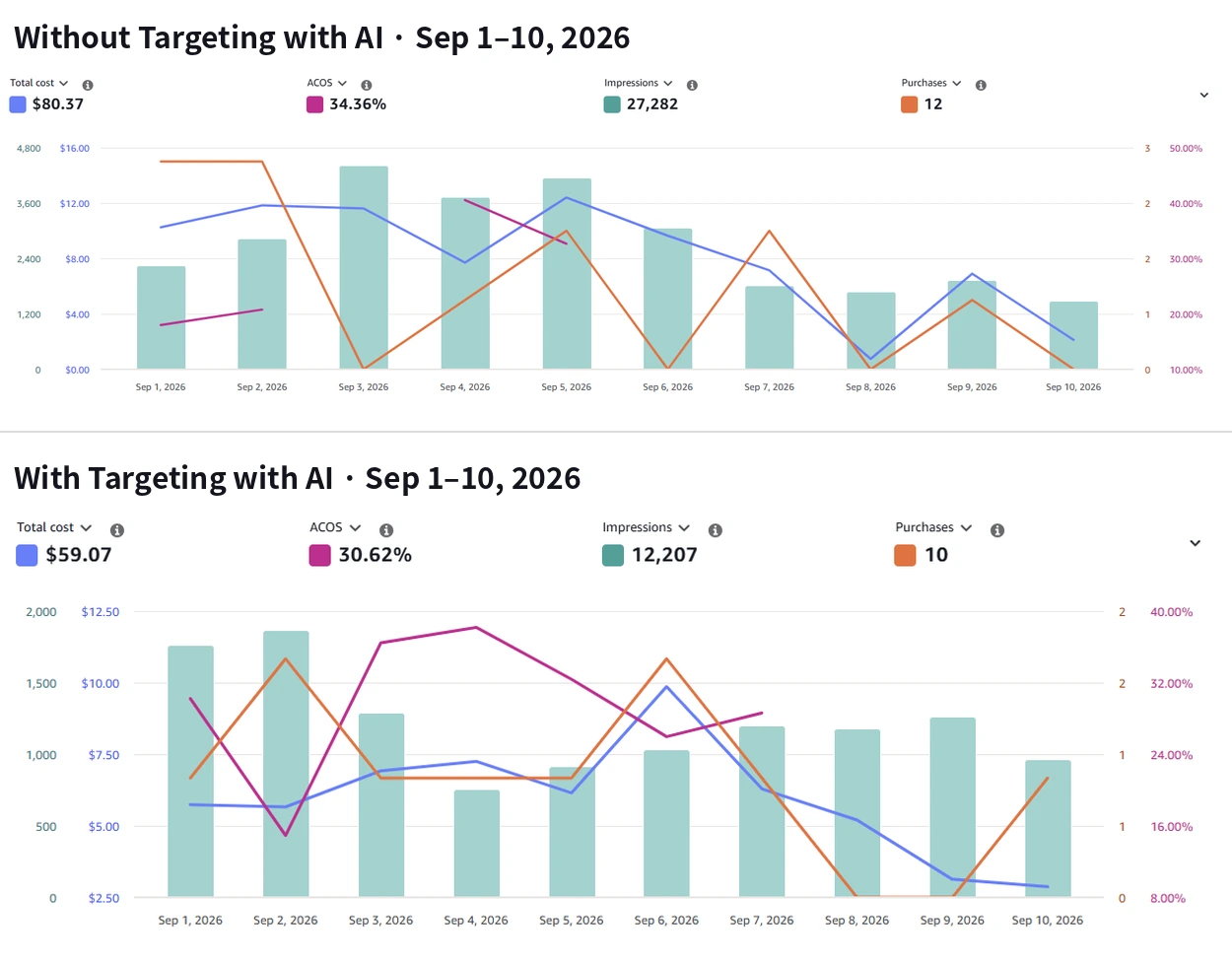
What we saw. From September 1–10, 2026, a campaign without AI spent $80.37 for 12 orders at 34.36% ACOS (ad spend as a share of ad-attributed sales); the campaign with AI spent $59.07 for 10 orders at 30.62% ACOS. An order cost $5.91 with AI versus $6.70 without. That's one pair of campaigns over ten days, so treat it as an early signal.
Display campaigns: lots of clicks, no orders
The ads console now has a new campaign type, Display: a banner or video that follows shoppers onto other books' pages and off Amazon. It isn't Sponsored Products or Sponsored Brands video — whether that kind of video pays off for books is in video ads for books.
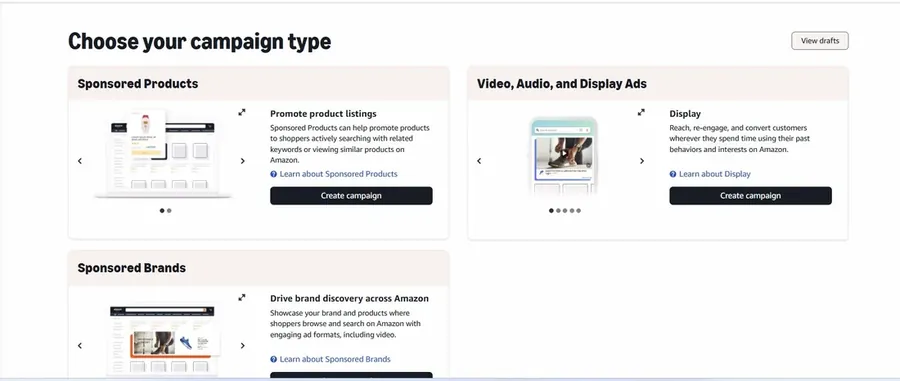
The report looks great: tens of thousands of impressions, clicks around $0.20, 50–80% video completion. But there are no orders: the shopper wasn't searching, your cover just crossed their path.
Our position: we don't run Display for books. A cheap click isn't the metric; orders are. A campaign with $0.20 clicks and no orders costs more than one with $1.20 clicks and an order every ten clicks.
Your ads also show off Amazon
Sponsored Products campaign settings have an Adjust reach on and off Amazon block with two options: Increase reach off Amazon (ads also run on other sites) and Limit reach to Amazon (Amazon's own placements only). The first is the default. Checked in our account on August 31, 2026.

What it means for your money. An off-Amazon impression reaches someone who wasn't searching. Clicks are cheaper, fewer people buy, and the money comes out of the same daily budget as search. What to do: choose Limit reach to Amazon when you create a campaign. How to see how much has already gone off Amazon: Amazon Ads placements and bidding strategy.
The FTC lawsuit over Amazon's ad auction
On August 31, 2026, the US Federal Trade Commission and the attorneys general of 22 states sued Amazon. The case is about the ad auction, which means the bids we all pay.
Amazon said its auction was second-price: the winner pays a cent more than the next bid. The complaint says Amazon inserted a higher second bid and charged advertisers their own bid, in Sponsored Products in almost 80% of cases. It puts the scale at over $20 billion and 1.2 million advertisers over seven years. Amazon denies it and says the average cost per click for sponsored product search ads, adjusted for inflation, stayed flat from 2019 to 2024. The case is 2:26-cv-03097 in the US District Court for the Western District of Washington (full complaint).
What it means for your money. Whatever the court decides, treat your bid as the price you'll pay, not a ceiling. Set it at your limit with no "just in case" margin, and check the actual CPC in your reports. To find that limit, use the break-even ACOS calculator.
There's no compensation to claim yet: this is a government lawsuit, not an advertiser class action, so there's no fund and no claim form. Sites offering to "file your Amazon refund claim" are offering something that doesn't exist. Don't give them your email or account details.
Legacy Amazon Ads reports retire on December 31
On June 8, 2026 Amazon made unified reporting available to all advertisers — Measurement & Reporting → Reporting — and announced that the legacy Sponsored ads reports pages will be retired by December 31, 2026 (Amazon Ads, as of September 2026). Unified reporting keeps up to 15 months of daily data and up to 6 years of monthly data. Amazon says an automated migration tool for scheduled reports will be available "soon"; as of late September there's still no date.
One more detail: unified reporting uses a different attribution method, so its numbers may not match your old reports. That's expected, not an error.
What to do now:
- Open Measurement & Reporting → Sponsored ads reports and list the reports you have on a schedule.
- Download the historical reports you need while the old pages still work.
- Rebuild the same reports in Reporting and compare the numbers.
Detailed reports such as search terms have always had short retention. We keep our history in AuthorLens, an analytics dashboard for Amazon KDP. We use AuthorLens daily and have a business relationship with it. Ad data arrives through the official Amazon Ads API: on connection it pulls up to 12 months back (the last three within minutes), and from then on daily history by book and keyword stays on its side. The honest downsides: it covers Amazon only, and for now it only reads data — it doesn't change bids or campaigns; one-click fixes and an autopilot are coming soon. What neither KDP nor Amazon Ads reports show is covered in our KDP sales dashboard guide, and how to judge the ads themselves in Amazon Ads for authors: judge campaigns by profit, not ACOS.
What to do this week
- Open Account → Getting Paid and make sure your royalties go to an approved provider or a bank account.
- Switch Kindle books priced above $9.99 to 70% in Kindle eBook Pricing.
- Check whether your black-and-white books without illustrations can move to groundwood paper.
- In your ad campaigns, choose Limit reach to Amazon, and don't run Display for books.
- Download the old Amazon Ads reports you need and rebuild them in Reporting before December 31.
- Plan new releases ahead: no more than two per format per week.
What's circulating but not confirmed by Amazon
- "New AI disclosure rules." The AI-content disclosure requirement exists, but it dates from September 2023. Today it reads: disclose AI-generated text, images (including covers) and translations; AI-assisted work — you wrote it and AI helped edit or brainstorm — doesn't need disclosing (KDP Help, as of September 2026). What gets accounts closed: KDP account terminated or suspended.
We check these rules against KDP Help every month. Next check: late October 2026.
FAQ
How many books can I publish on KDP per week?
No more than two new titles per format per week — Kindle, paperback and hardcover counted separately. Editing published books doesn't count toward the limit.
What price gets 70% Kindle royalty in 2026?
$2.99 to $12.99 on Amazon.com since July 7, 2026 (it was $9.99). Books already priced above $9.99 don't switch automatically — change the royalty option to 70% in Kindle eBook Pricing.
Why did KDP stop paying my Payoneer or Wise account?
Since August 1, 2026, KDP pays only to accounts at payment providers in its program (Payoneer, Wise, WorldFirst, PingPong, Airwallex and others — 46 in total) or to a regular bank account. Payments also stop if you haven't completed identity verification (KYC) with your provider. Check Account → Getting Paid.
Can readers download Kindle books now?
Since January 20, 2026, buyers can download EPUB and PDF files of books published without DRM. Kindle Unlimited borrowers can't.
When do the old Amazon Ads reports retire?
The legacy Sponsored ads reports pages retire by December 31, 2026. Move scheduled reports to unified Reporting before then.
Which languages does Kindle Translate support?
As of September 2026: from English into French, German, Italian, Portuguese (Brazil) and Spanish (Spain), and into English only from French for now. It's an invite-only beta for eBooks only.
What is groundwood paper on KDP?
A third paper option for black-and-white paperbacks, next to white and cream. Printing costs per page are about 5% lower. It's not for books with heavy ink coverage, and it isn't available for color books or hardcovers. You can switch a published book to groundwood from your Bookshelf.
What is Targeting with AI in Amazon Ads?
A Sponsored Products feature: Amazon adds keywords and product targets similar to yours and pauses the ones that underperform. You turn it on with the Apply to this campaign checkbox, only when creating a campaign; it's still in beta.
Royalties and ad spend per book, side by side — the way we track our own books. It also shows the highest ACOS each book can afford. Leave your email and we'll send it.
One email a week at most. Unsubscribe in one click.
Real campaign numbers, not theory. One recent case: the same keyword in two match types — broad at 9% ACOS, exact at 49%. In the Facebook group KDP Ads & Profit we break down cases like this every week.
Join the group →or follow Darya on LinkedIn

Selling books on Amazon KDP since 2023, 77,600+ copies sold. Every number in these articles comes from our own KDP and Amazon Ads accounts.
All articles