Getting started
How to sell ebooks on Amazon: Kindle royalties, KDP Select and DRM
To sell ebooks on Amazon, you publish a Kindle eBook through KDP, price it between $2.99 and $12.99 for the 70% royalty, and decide on KDP Select and DRM. But a Kindle eBook sells differently from a paperback: other royalties, other price rules, an exclusive program and different ad math. Here's what's specific to the eBook, with our own numbers.
Why eBooks get their own article
A Kindle eBook doesn't sell the way a paperback does. Different royalties, different price rules, its own exclusive program, and a different logic: a paperback is bought once, while an eBook might never be bought at all — it can be read through a subscription, and you get paid for pages.
This article covers only what's specific to the eBook. The whole path from zero to first sales is in how to sell books on Amazon KDP.
Should you start with the eBook?
Honest answer: it depends on the book. This is the main fork of the whole article.
Cookbooks, workbooks and reference books: no. Cookbooks barely sell on Kindle — in our experience about 90% of sales are paperback. The reason is obvious: people cook from an open book on the counter, not from a phone. The same goes for anything people flip through and come back to: reference books, workbooks, books with tables.
For these, the order is paperback first, then the eBook as a second format on the same product page. It's cheaper and picks up the buyers for whom the paperback is too expensive.
Fiction: yes. Readers buy fiction on Kindle willingly, and this is where eBooks make real money. A novel is read straight through on a screen, without going back to page 47 — and fiction is where Kindle Unlimited works: pages read earn money whether or not anyone bought the book. With a series it's especially visible: a reader borrows book one and follows the series through the subscription.
So "the eBook is small change" is true for cookbooks and reference books and false for fiction.
File format: EPUB, not PDF
This is the most common mistake, and it costs reviews.
Upload the book as EPUB (Google Docs, for example, exports to EPUB). KDP also recommends DOCX and KPF, the format Kindle Create produces. KDP accepts PDF too, but calls it not recommended: a PDF doesn't support reflowable text (KDP Help). The font size doesn't adapt to the screen, and on a phone the reader has to zoom and drag the page to read it.
That's exactly what earns negative reviews, and they stay on the book forever, even when the text itself is excellent.
An eBook has no minimum length, unlike a paperback's 24 pages. And it doesn't need an ISBN: "eBooks and low-content books are the only formats where an ISBN is optional" (KDP Help). Amazon gives the eBook its own ASIN (Amazon's product number).
Royalty: 35% or 70%
KDP gives you two royalty options, and the gap is bigger than it looks.
70% requires, on Amazon.com, a list price between $2.99 and $12.99. The ceiling was $9.99 until July 7, 2026, when KDP raised it to $12.99 (KDP Help). Books already priced above $9.99 don't switch automatically — you choose 70% yourself in the pricing step. Other conditions: the sale is in a 70% territory, and the book isn't mostly public-domain content. Otherwise the sale earns 35%.
One more condition that's easy to miss when you price two formats back to back: for 70%, the eBook must be "at least 20% below the list price on Amazon for any physical edition" (KDP Help).
And the main trap of the format: on the 70% option KDP subtracts a delivery fee from each sale — "US $0.15/MB" on Amazon.com. A text-only book is about 1 MB, which is nothing. An illustrated book easily reaches 10 MB, and that's $1.50 off every copy. The 35% option has no delivery fee.
In some marketplaces — Japan, India, Brazil and Mexico — 70% is available only if the book is enrolled in KDP Select (KDP Select).
The full breakdown of both options with examples: KDP royalties explained.
KDP Select and Kindle Unlimited
The checkbox next to pricing that causes the most confusion.
KDP Select applies only to the eBook. KDP Help: "KDP Select is a free 90-day program for Kindle eBook only" (KDP Help). It doesn't touch paperback or hardcover at all.
A book enrolled in KDP Select is automatically included in Kindle Unlimited — a subscription where the reader pays for access to a library, not for a book. You're paid not per copy but per page read, from the KDP Select Global Fund. KDP reports that total KDP Select author earnings for August 2026 were $69.4 million (KDP Select).
Enrolled books are also eligible for two promotions: Kindle Countdown Deals (a time-limited discount while you keep earning royalties) and Free Book Promotions (the book is free for a limited time).
Exclusivity: what you give up for KDP Select
Read this before you tick the box. From KDP Help (as of September 2026):
- "Your Kindle eBook must also be exclusive to the Kindle Store for the KDP Select enrollment period" — the eBook can be sold only in the Kindle Store for the whole term. That includes your own website: no selling the eBook digitally anywhere else.
- "During the 90-day enrollment period, the Kindle eBook can only be distributed through KDP and public libraries. However, you can continue to distribute print, video, audio, or other formats of your title elsewhere" — print, audio and other formats are free to sell anywhere.
- "Every Kindle eBook enrolled in KDP Select is automatically renewed unless you opt out" — it renews itself. To stop it: Bookshelf → the three dots next to the eBook → Manage KDP Select → uncheck automatic renewal. The current term still runs to the end.
So exclusivity covers only the digital format and doesn't limit your paperback. But remember the auto-renewal: you tick the box once, and it keeps working on its own.
DRM: the 2026 change
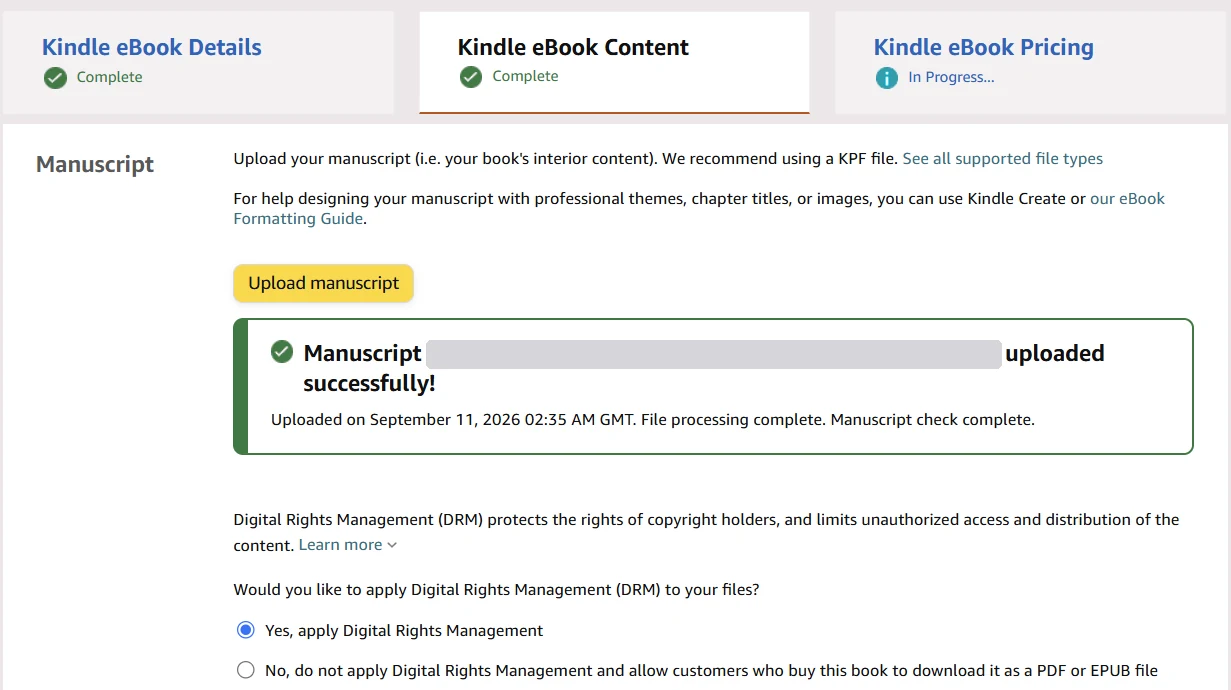
DRM (Digital Rights Management) locks the file so it can only be read in Kindle apps and on Kindle devices. It's chosen on the Kindle eBook Content step, right under the manuscript upload.
Since January 20, 2026, "verified purchasers can download the EPUB and PDF files of your confirmed DRM-free books" and move them to non-Kindle devices (KDP Help). What that means in practice:
- DRM is on by default. A new book becomes downloadable only if you choose no DRM.
- Older DRM-free books weren't switched automatically. For books published without DRM before December 9, 2025, you have to confirm the choice to allow downloads.
- Kindle Unlimited readers can't download. "Customers who borrowed your books through Kindle Unlimited or other services can't download the EPUB/PDF files, even if the books are DRM-free."
- You can change it at any time, and it takes 24–72 hours. Files readers already downloaded stay with them if you turn DRM back on.
- Royalties don't change: "Your royalty rates and payment structure remain unchanged regardless of your DRM selection."
Our view: DRM doesn't stop determined pirates, but a free EPUB download makes copying a one-click job. For a nonfiction book whose value is in the information, we keep DRM on. For fiction, where readers on Kobo or other e-readers want the file, going DRM-free can be a fair trade. Decide per book; it's reversible now.
Another eBook-only change in 2026: Kindle Translate, a free invite-only beta that translates English eBooks into French, German, Italian, Portuguese (Brazil) and Spanish. Other 2026 changes in one place: KDP rule changes 2026.
What you can't change after publishing
A common assumption is that an eBook is easier to edit than a paperback. According to KDP Help, it's the other way round.
For a Kindle eBook, KDP Help lists the language, title, subtitle, edition number and primary author as locked, and the 72-hour window that paperback and hardcover get doesn't apply to eBooks (KDP Help).
In practice it's different. In our account, the title and subtitle fields of a published eBook are open, and we've changed them after publishing without contacting support. The Help page is stricter than what the account actually allows — at least in our case.
What that means for you: don't rely blindly on either one. Before publishing, write the title as if it can never change. If the book is live and you need a fix, open it in your account first and see whether the field is open. If it's closed and it's a typo, KDP support will correct it: "typos, e.g. misspelling of a name." Shortening the title or switching to a pen name won't be done that way — KDP asks for a new edition (KDP Help).
Cover, price, description, keywords, categories and now DRM can be changed as often as you like. The full list of fields to triple-check: what you can't change after publishing on KDP. The publishing form for Kindle follows the same order as for print: how to publish a book on Amazon KDP.
Ads for eBooks: different math
Campaigns are set up the same way, but the arithmetic is different, and this is where beginners lose money.
A Kindle click is cheaper — in our campaigns about $0.15–0.30. But the royalty drops more than the click does. A $4.99 eBook on the 70% option earns about $3.49, minus delivery — about $3.34 for a 1 MB file. A $24.99 paperback earns $10–11.

Let's count. With a $3.34 royalty and a $0.25 click, you can afford about thirteen clicks per sale. Past that, each sale loses money. So the eBook needs roughly one sale per thirteen clicks — a 7–8% conversion rate — just to break even.
Break-even ACOS is royalty divided by price, and for an eBook you calculate it from the eBook price, not the paperback's. At 70% it comes out high — about 67% for our $4.99 example — which makes eBook ACOS look forgiving. At 35% it drops to 35%. Don't carry the paperback's number over: the thresholds are different, and a $4.99 book leaves very little room in dollars.
Calculate before launching, not after. How: Amazon Ads for authors: profit, not ACOS, or plug your numbers into our KDP royalty and break-even ACOS calculator.
Kindle Unlimited pages: a separate report
Pages read aren't part of the sales and ACOS in your campaign report. Kindle Unlimited pays for pages read, not purchases — so a campaign can look unprofitable while the book earns money through pages. Amazon Ads shows ad-attributed reads separately, in its KENP metrics (KENP, Kindle Edition Normalized Pages, is the standard page count KDP pays Kindle Unlimited royalties on).
The pages themselves are in KDP, under Reports → KENP Read. Monthly KENP numbers "may change and will be finalized near the 15th of the following month", so the current month's figure is still moving. If your book isn't in KDP Select, that report is empty: pages are counted only for Kindle Unlimited. What each KDP report shows and hides: KDP sales dashboard.
How to count organic sales by hand: organic vs ad sales on KDP. To see how many Kindle copies sold from ads versus organically, and what each book earns after ads together with its print formats, we use AuthorLens, an analytics dashboard made only for Amazon KDP. We use AuthorLens daily and have a business relationship with it. It splits organic and ad sales by book, format and day, and shows net profit per book and marketplace — royalties minus ads.
The order of steps
- For cookbooks, workbooks and reference books, publish the paperback first and add the eBook as a second format on the same product page. For fiction, the eBook can be the main format.
- Prepare the file as EPUB. Compress images before uploading — file size is money on the 70% option.
- Price the eBook between $2.99 and $12.99 and at least 20% below the paperback to get 70%.
- After uploading, check the file size and delivery cost KDP shows on the pricing step, next to the royalty.
- Decide on KDP Select separately, after reading the exclusivity terms. It doesn't affect the paperback.
- Decide on DRM per book. It's reversible now.
- Before running ads, calculate break-even ACOS from the eBook price, not the paperback's.
Don't want to deal with ads yourself? Campaign setup and ongoing management can be handed to an ads specialist we trust — message him on Telegram @Lamgr_557359.
FAQ
How much does Amazon pay for an ebook?
35% or 70% of the list price. On Amazon.com, 70% applies to prices from $2.99 to $12.99 (the cap was $9.99 until July 7, 2026), in 70% territories, for books that aren't mostly public domain. On the 70% option, a delivery fee of $0.15 per MB is subtracted on Amazon.com; the 35% option has no delivery fee.
What format should I upload my ebook in?
EPUB. KDP also recommends DOCX and KPF. PDF is accepted but not recommended because it doesn't support reflowable text, so on a phone the reader has to zoom and drag the page, which leads to bad reviews.
Is KDP Select worth it?
For fiction and series it often is, because Kindle Unlimited pays for pages read. The price is exclusivity: for each 90-day term the eBook can be sold only in the Kindle Store, and enrollment renews automatically unless you opt out. Print and audio can still be sold anywhere.
Do I need an ISBN to sell an ebook on Amazon?
No. KDP Help says eBooks and low-content books are the only formats where an ISBN is optional. Amazon assigns the eBook its own ASIN.
Should I publish my Kindle book with or without DRM?
DRM is on by default. Since January 20, 2026, buyers can download DRM-free KDP books as EPUB or PDF, while Kindle Unlimited borrowers cannot. Royalties don't depend on the choice, and you can change DRM at any time, with changes taking 24 to 72 hours.
Royalties and ad spend per book, side by side — the way we track our own books. It also shows the highest ACOS each book can afford. Leave your email and we'll send it.
One email a week at most. Unsubscribe in one click.
Real campaign numbers, not theory. One recent case: the same keyword in two match types — broad at 9% ACOS, exact at 49%. In the Facebook group KDP Ads & Profit we break down cases like this every week.
Join the group →or follow Darya on LinkedIn

Selling books on Amazon KDP since 2023, 77,600+ copies sold. Every number in these articles comes from our own KDP and Amazon Ads accounts.
All articles