Getting started
KDP account terminated: why it happens and what to do
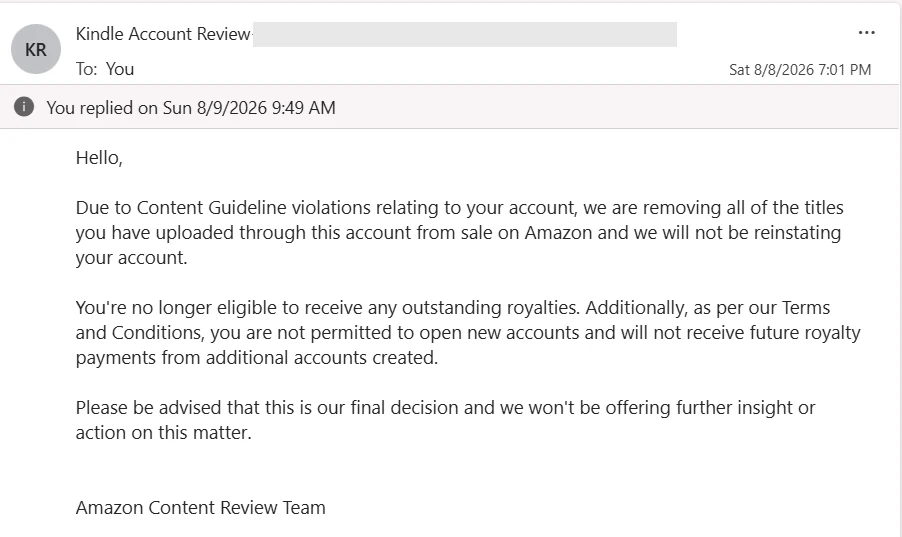
When Amazon terminates a KDP account, every book comes off sale, unpaid royalties are forfeited, and you may not open a new account; a suspension is a pause, and it's where an appeal works best. Below: what the email means, how to appeal step by step, and the nine common reasons accounts get closed, so you can fix them while your account still works.
What a KDP termination email says
The email at the top of this page is real: it came from Amazon's Content Review Team in August 2026, citing "Content Guideline violations." Four points in it, and each one matters:
- every title on the account comes off sale, not just the one that broke a rule;
- outstanding royalties won't be paid;
- you may not open new accounts, and royalties from any you do open won't be paid;
- the decision is final.
The third point kills the most common plan, "I'll just open a new one." The KDP Terms say it directly: "If we terminate your account, you will not establish a new account," and "If after we have terminated your account you open a new account without our express permission, we will not owe you any Royalties through the new account" (KDP Terms and Conditions, last updated September 27, 2024).
Here is what an account can hold, and what goes with it:

How many reviews a book needs, what Amazon forbids and where to get first reviews without risking your account. Leave your email and we'll send it.
One email a week at most. Unsubscribe in one click.
Suspended, terminated, or one book blocked?
These are three different situations, and the first thing to do is figure out which one you're in.
| Situation | What it means | Chances |
|---|---|---|
| One book Blocked | The account works; one title is blocked from publishing or editing | Best. Usually solved through KDP Support |
| Account suspended | The account is frozen while Amazon reviews it or waits for your reply | Real, if you respond well |
| Account terminated | All books removed, unpaid royalties forfeited, "final decision" | Low, but not always zero |
The Terms allow both: Amazon may "terminate this Agreement and your access to your Program account or suspend your Program account at any time if we have concerns with your account, or activity relating to your account, or if you are in breach of applicable laws or this Agreement."
What to do if your KDP account is terminated or suspended
The logic here runs against instinct. Defending yourself and arguing your innocence is the worst strategy. Amazon has already decided based on its data, and arguing with it changes nothing.
Step 1. Read the email line by line. Note which policy it cites (Content Guidelines, reviews, multiple accounts, rights) and whether it's a suspension or a termination. The Terms promise: "We will notify you upon termination and will provide instructions regarding how to appeal that termination if you believe it is in error." Follow those instructions and reply through the channel they give.
Step 2. Don't open a new account. See the Terms above: that forfeits royalties on the new account too, and in our experience Amazon links accounts by payment details, tax information and devices.
Step 3. Gather your evidence. Licenses for images and fonts, contracts with writers or illustrators, proof you own the text, and documents showing your name matches your tax and bank details. Whatever answers the specific reason in the email.
Step 4. Write one calm, specific appeal. What has worked in our experience:
- If there was a violation, own it. State what you did, that you understand why it breaks the rules, what you've already fixed, and what you'll do so it doesn't happen again. These letters get read differently from objections, and accounts do get reinstated.
- Ask for a manual review. A large share of enforcement is automated: a system spots matching data or an odd review pattern and acts without a human looking. Asking for a person to review the case often changes the outcome, because a person sees context an algorithm doesn't.
- If you did nothing wrong, say so calmly and explain what could look suspicious: a shared household, a family member with their own account, a payment provider you share. No accusations toward Amazon.
Step 5. Send it once and wait. Ten angry emails don't speed anything up.
Step 6. Know what happens to the money. Under the Terms, if Amazon terminates because you breached your warranties or the Content Guidelines, "you forfeit all Royalties not yet paid to you." If it finds "deceptive, fraudulent, or illegal activity," it "may permanently withhold payments." Budget as if unpaid royalties are gone until you hear otherwise.
An appeal isn't a guarantee, and the email above shows it: there, the decision was final. But the odds are real, and much better for someone who admits the problem and asks for a manual review than for someone who writes outraged letters. A suspension is a pause while Amazon waits for your answer, and that's where appeals work best. A termination with "final decision" wording is rarely reversed. Some authors hire lawyers who specialize in Amazon appeals; nobody can honestly guarantee reinstatement.
If one book is blocked, not the account
This is a different, easier situation. The account works, the other books keep selling, and one title is blocked. Getting it back is usually easier than an account.
In your Bookshelf the book shows as Blocked. KDP Help explains: "Your book doesn't meet our content guidelines and is blocked from publishing or editing." You can't delete it from your Bookshelf either, and if the reason isn't clear, KDP Help suggests contacting support. The Content Guidelines add that if a title is removed, "they can appeal our decision" (Content Guidelines).
The email to support follows the same rules as for an account:
- don't argue with the decision, ask for a manual review, since books are often blocked by automated checks;
- if there was a violation, admit it and say exactly what you fixed.
Why KDP accounts get terminated: 9 common reasons
Each of these is still recommended in author chats and groups. Each can cost you the account.
1. Buying reviews
The hardest one, because there's no simple answer.
On one hand, books without reviews don't sell. A buyer sees two similar books, one with a dozen reviews and one with none, and picks the first even if the second is better. Ads for a book with no reviews cost more per sale: you pay for the clicks, and they don't convert.
On the other hand, bought reviews get accounts closed. Amazon removes reviews posted in exchange for compensation (KDP Help), and the KDP Terms tie your account to the review rules: "You are subject to the Amazon Community Guidelines. We reserve the right to take any action with respect to your account in accordance with those Guidelines" (KDP Terms and Conditions). Review marketplaces, review-swap groups, freelancers selling five stars: it's all the same violation.
How Amazon sees it. Not by hand. Amazon sees links between customer accounts: shared devices, payment data, shipping addresses, timing and order of actions. One reviewer account that writes for dozens of sellers drags down everyone it wrote for. "We're too small to notice" doesn't apply: you get found through the reviewer, not through your own activity.
What's allowed. KDP Help draws the line for books: "Offering anything other than a free or discounted copy of the book, including gift cards, will invalidate a review." So giving readers a free or discounted copy is fine; paying for the review is not. The rule of thumb: the closer a method is to a real reader who actually read the book, the safer it is. How we get the first reviews within the rules is in how to get book reviews on Amazon.
2. Asking family and friends for reviews
Looks innocent: three friends buy the book and write a few words.
Amazon's review policies don't allow reviews from the seller's family members, and in our experience the same risk applies to close friends. Those links are detected technically: same shipping address, same device, a card in the same name, orders from one Wi-Fi network.
What it looks like to Amazon. Three reviews in two days on a new book, all from accounts that never bought anything in your category, shipped to one street. Each detail means nothing alone; together they make the pattern the system looks for every day.
The risk isn't losing three reviews. It's that Amazon starts reviewing the whole account.
3. Running more than one KDP account
"Just open one in your spouse's name" is advice you hear constantly.
KDP Help: "Both Amazon and KDP have a policy which prevents creating a second account under a different email address, or under an email address that's associated with an already existing account" (KDP Help). If you already have books on two accounts, KDP can merge them into one and close the other. Ask for that before Amazon finds the second one itself.
What it looks like to Amazon. The same Payoneer or bank account, the same tax details, the same computer and home Wi-Fi. In our experience a shared payment account is enough, even if the second account is in another person's name.
The worst part: when this is found, often both accounts go, not just the second. You risk what already works and earns for something that earns nothing yet.
4. Inflating your own sales
Buying your own book from several accounts to push up the Best Sellers Rank (BSR).
That's manipulation, and the Terms cover it: "You will not attempt to exploit the KDP service or any other Amazon program or service." Amazon sees purchases from linked accounts, cards or devices.
What it looks like. A burst of sales with no ad clicks and no growth in organic impressions. Sales with no traffic that could explain them. You can see that even in your own reports.
And the cost is real while the effect is temporary. BSR reflects recent sales, so it falls back within days once the buying stops. You pay full price plus printing for a few days near the top.
5. Using other people's trademarks in titles and keywords
The classic: put a famous brand, a popular author's name or a series title into your subtitle or backend keywords to catch their traffic.
KDP's metadata guidelines list "Unauthorized reference to a trademarked term" and references to other authors as not allowed in titles, and trademarked terms and other authors' names as not allowed in keywords (KDP Help). On top of that, the rights holder can file a complaint directly. Then the book is removed and a rights complaint sits on your account.
What it looks like. Rights holders monitor search results for their names, often automatically. The complaint goes straight to Amazon, the book comes down, and you prove your case afterward.
This hits diets, methods and programs with registered names hardest. Simple rule: if a name is in the trademark register, it doesn't go into your listing, not even into backend keywords nobody sees.
Our own case. One of our books went out with a title too close to someone else's trademark. There was no complaint yet; we caught it ourselves, unpublished the book and put it out again under a different title.
That's cheaper. A book you pull in time costs you a new listing and its reviews. A book pulled after a rights complaint also leaves a mark on your account, and those marks add up.
6. Publishing the same book under different covers
One book, several titles, several listings, to take up more space in search.
In our experience, KDP treats this as duplicate content. Duplicates get removed, and if it's systematic, the account is next.
What it looks like. Amazon compares file contents, and the same text under different titles is obvious. A new cover doesn't hide it.
The same goes for books built from PLR content (private label rights: ready-made texts) sold to hundreds of people at once. KDP's Content Guidelines say it "will not accept content under copyright that is freely available on the web unless it's provided by the owner of the copyright," and won't allow "undifferentiated versions of public domain titles if a free version is available in our store" (Content Guidelines). Different language editions of one book are not duplicates; they're allowed and published separately.
7. Hiding AI use
Precision matters here, because the myth runs the other way.
AI itself isn't banned. You can publish a book made with it.
What's required is telling KDP. The Content Guidelines say: "We require you to inform us of AI-generated content (text, images, or translations) when you publish a new book or make edits to and republish an existing book through KDP." So it applies both to new books and to updates.
The distinction people keep mixing up:
- AI-generated: the text, images or translation were created by an AI tool, "even if you applied substantial edits afterwards." You must disclose this.
- AI-assisted: you created the content yourself and used AI to "edit, refine, error-check, or otherwise improve" it. This doesn't need disclosure.
Answering honestly costs nothing. Getting caught with a false answer later is a different story.
8. Trying to get rid of a negative review
First, what many don't know: you can't contact the reviewer. You see the name on their profile, and that's it. Unlike sellers of physical products, a KDP publisher gets no buyer email, no address, no way to write to them. So asking them to change the rating is technically impossible.
That's why "fighting a review" takes other forms, and each is a violation.
Mass-reporting a review with no grounds. The Report link is for reviews that break the rules: spam, abuse, text copied from elsewhere, a review about a different book. Reporting a review only because it's negative is abuse of the feature, and repeated baseless reports get noticed.
Paying for "review removal." Offered on the same marketplaces that sell reviews, and it works the same way: mass reports or reviewer accounts. To Amazon it's the same review manipulation, with the same consequences.
Asking friends to mass-click "not helpful." An attempt to push a review down with someone else's hands. It's manipulation, and it's detected the same way as fake reviews, through links between accounts.
What to do instead. Report a review only when it actually breaks the rules. KDP Help: "If you believe a review violates the Community Guidelines, click the Report link underneath the review" (KDP Help).
In every other case the only working path is to read the review carefully. A negative review at the top of the page often points to a real flaw: tiny print, too few examples, poor print quality. That's fixed with a new version of the file, and it works better than any attempt to remove the review, because the next buyers get the fixed book. We cover this in why is my book not selling on Amazon.
One negative review among a dozen normal ones barely affects sales; people read them together. It only hurts when there are two or three reviews in total. The best answer to a bad review is the next five good ones.
9. Entering account details "whatever's easiest"
KDP needs your personal details, bank details and tax information to set up an account (KDP Help). The name must match your ID, your bank account must be in the same name, and the tax interview must match both.
One letter off in your name, or someone else's bank account for royalties, and verification fails. The account doesn't open, or payments stop. Since August 1, 2026 KDP also pays only to a bank account in your name or to one of 46 approved payment providers, such as Payoneer or Wise; with any other provider, payments stop. Revolut isn't on the provider list and works only as a regular EU bank account. See KDP rule changes 2026.
It looks minor next to the others, but it's where many people get stuck before the first book. And it's harder to fix than it looks: changing the name on an account that's already verified means contacting support with documents, not editing a field. Keep your ID in front of you while filling in the form. Step by step: KDP account setup.
Cheat sheet: all nine in one table
| Method | What it risks | What to do instead |
|---|---|---|
| Buying reviews | Account termination | Free or discounted copies to real readers |
| Reviews from family and friends | A review of the whole account | Don't ask people linked to you by address or payment |
| More than one KDP account | Often both accounts closed | One account; ask KDP to merge if you already have two |
| Inflating your own sales | Manipulation, lost royalties | Ads: same money, but allowed |
| Other people's trademarks in the listing | Book removed plus a rights complaint | Your own keywords, checked against the trademark register |
| Duplicates under new titles | Books removed, account at risk | A new book instead of repackaging an old one |
| Hidden AI use | False information on file with KDP | Answer the AI question honestly when publishing |
| Fighting a negative review | Review manipulation | Fix what the reviewer complained about |
| Details "whatever's easiest" | Failed verification, frozen payments | Match your ID, bank and tax info before you start |
If your account is still active
Don't panic, and don't delete everything.
Quietly remove what can be removed: other people's trademarks in titles and keywords, duplicate books, a second account you don't use (or ask KDP to merge it). Fix any account details that don't match your documents. It's half an hour of work and removes most of the risk.
Don't change everything in one day: pulling half your books at once is its own unusual spike in activity. Go one item at a time and watch the account. And check whether someone else logs into your account from another device; shared logins can look like a hacked account.
The bottom line
The account is the asset. Not the books, not the covers, not the keywords you've collected. A book can be rewritten in a month. An account with two years of sales history can't.
None of the nine shortcuts above pays enough to justify that risk. Bought reviews save a few months, a borrowed trademark saves a few cents per click, a second account buys one more try. The stake in every case is the same, and it's out of all proportion to the gain.
A simple test for any new trick: is there a real buyer in the chain who decided to buy the book on their own? If yes, the method is fine, even if it's slow. If the buyer is replaced by a freelancer, a friend or a second account, it belongs on the list above, whatever the chat calls it.
How to build the business the right way, from the start: how to sell books on Amazon KDP.
FAQ
Can a terminated KDP account be reinstated?
Sometimes. The KDP Terms say Amazon will notify you and give instructions on how to appeal if you believe the termination is in error. In our experience, what works is admitting any real violation, explaining what you fixed, and asking for a manual review. Arguing and demanding rarely works, and a termination marked as a final decision is rarely reversed.
What is the difference between a KDP suspension and a termination?
A suspension freezes the account while Amazon reviews it or waits for your reply, and it's where appeals work best. A termination removes all your titles from sale, forfeits unpaid royalties if it was for a breach of the Terms or Content Guidelines, and bars you from opening a new account.
Do I get my royalties if my KDP account is terminated?
Usually not. The KDP Terms say that if Amazon terminates because you breached your warranties or the Content Guidelines, you forfeit all royalties not yet paid, and it may permanently withhold payments where it finds deceptive or fraudulent activity.
Can I open a new KDP account after termination?
No. The KDP Terms say you will not establish a new account after termination, and that Amazon will not owe you royalties through a new account opened without its express permission. In our experience accounts are linked through payment, tax and device data.
Can I have two KDP accounts?
No. KDP Help says Amazon and KDP have a policy that prevents creating a second account. If you already have books on two accounts, KDP can merge them into one and close the other; ask for that yourself.
My KDP book is Blocked. What does that mean?
According to KDP Help, a Blocked book doesn't meet the content guidelines and can't be published or edited, and it can't be deleted from your Bookshelf. The rest of your account keeps working. Contact KDP Support, ask for a manual review, and if there was a violation, say what you fixed.
Royalties and ad spend per book, side by side — the way we track our own books. It also shows the highest ACOS each book can afford. Leave your email and we'll send it.
One email a week at most. Unsubscribe in one click.
Real campaign numbers, not theory. One recent case: the same keyword in two match types — broad at 9% ACOS, exact at 49%. In the Facebook group KDP Ads & Profit we break down cases like this every week.
Join the group →or follow Darya on LinkedIn

Selling books on Amazon KDP since 2023, 77,600+ copies sold. Every number in these articles comes from our own KDP and Amazon Ads accounts.
All articles