Tools compared
Publisher Rocket review: all 5 tools tested, great before you publish
Publisher Rocket is worth $199 if you're choosing a niche and keywords for your first books; once ads are running, it can't see your royalties or profit. We've used it since 2024 and, for this review, went through all five of its tools again. Below: what each screen shows, how to read the numbers, the limits nobody mentions, and who should buy it.
The short version
Publisher Rocket is a research tool for Amazon niches, keywords and categories. It costs $199 once, no subscription. It's good at the question before you publish: what book to make and which searches to target. After you publish, it goes blind. It doesn't see your royalties, your ad spend, whether a campaign makes a profit, or where your book ranks day to day.
Our verdict after two years of using it: a sensible purchase for a first book; once ads are running, you need a different kind of tool. Every number in Rocket is an estimate. Use it to compare niches, not to forecast income.
One warning before you buy: Rocket's own site says the one-time price may turn into an annual subscription.
How we tested it
This review isn't based on the sales page. We've used Rocket since 2024 and recorded a long video walkthrough of it. For this article we went through every tab again in version 2.0.100 for Windows on September 26, 2026, using the topic “gardening for beginners”.
Prices and terms were checked on publisherrocket.com the same day. Customer reviews are from Trustpilot.
What's inside: five tools
The Rocket homepage lists four tools, but the app now has five:
| Tool | The question it answers | When you need it |
|---|---|---|
| Keyword Search | how often a phrase is searched and how crowded it is | choosing a topic and title |
| Competition Analyzer | who ranks and how much they sell | checking a niche |
| Category Search | where it's easier to reach the top | choosing categories in KDP |
| Amazon Ads | which keywords and books to target | your first campaign |
| Reverse ASIN Lookup | which searches another book ranks for (ASIN is Amazon's product ID) | studying a competitor |
It covers eight marketplaces: the US, Canada, Australia, the UK, Germany, France, Spain and Italy.
Keyword Search: demand and competition for a phrase
Type the main word of your topic and Rocket pulls related phrases from Amazon's search suggestions. For each one it shows average page count, number of competitors, average price, average monthly earnings of ranking books, estimated Amazon searches per month and a Competitive Score from 0 to 100: green is open, red is crowded.

What matters in practice:
- Numbers load one phrase at a time, after you click the button in each row. The first result is just the list of phrases, so a long list takes a while.
- High-demand phrases are almost always red. For a new book, the interesting phrases have fewer searches and a lower score, like "vegetable gardening for beginners" above.
- Don't take everything. For a new book's ads, 10–20 precise phrases are enough — more on why below.
The best phrases go into your title, subtitle and the seven KDP keyword fields. How we fill those fields: Amazon KDP keywords.
Competition Analyzer: who sells and how much
For a phrase, Rocket lists the ranking books with their age in days, ABSR (average Best Sellers Rank), page count, whether the phrase is in the title (KWT), price, and estimated daily and monthly sales.

The classic mistake is reading MO Sales as income. It's revenue: list price times estimated copies. Amazon takes its share and the printing cost out of that; what's left is royalty. Then you pay for ads out of the royalty. A book showing $3,000 a month can easily leave its author $500–1,000, or run at a loss.
Also check who is selling. If page one is all publishers with 300–400-page references and thousands of reviews, a new book will pay a lot to get in. The Age column helps from the other side: when the leaders are 4–6 years old, a strong new book can overtake them.
Category Search: where it's easier to reach the top
Type a word and Rocket finds matching Amazon categories. For each one:
- Sales to #1 and Sales to #10 — daily sales needed to rank first or make the top ten;
- Publisher % — the share of books from large publishers;
- KU % — the share in Kindle Unlimited (N/A for print categories);
- selectable (you can pick this category directly in KDP) and duplicate (the same category appears in several places in the tree).

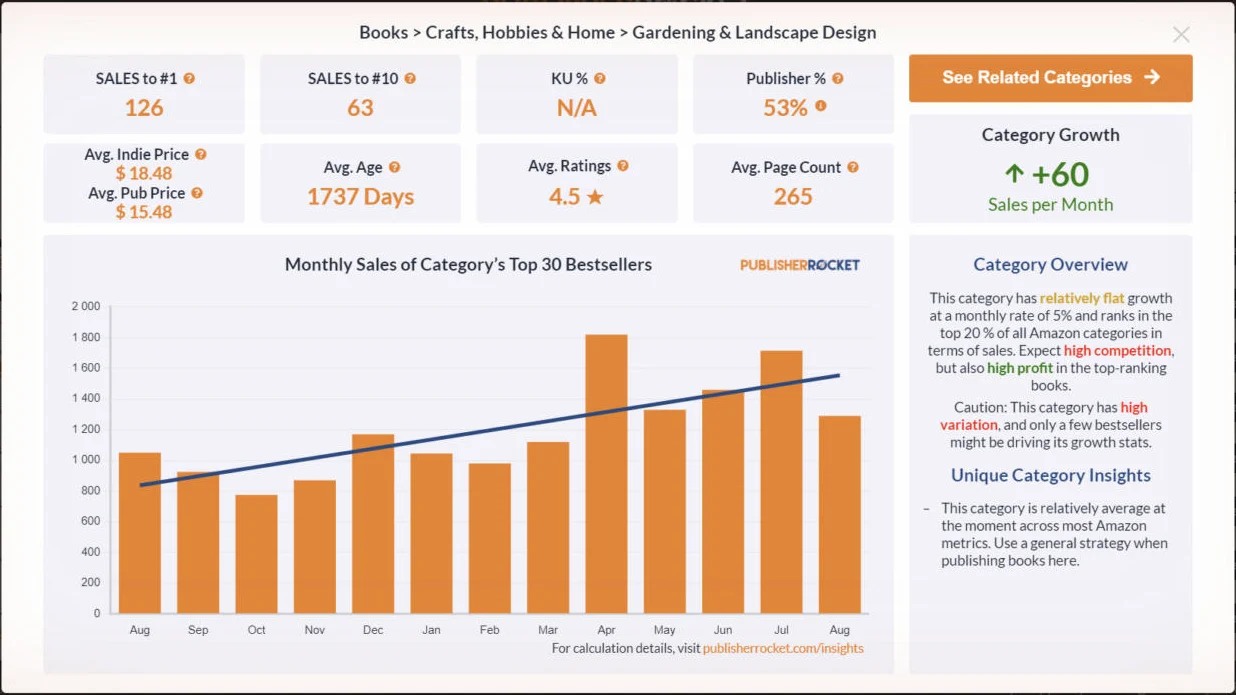
The most useful button is Insights. It opens a category card: average indie and publisher prices, average book age, rating, page count, monthly growth in sales, and a 12-month sales chart for the top 30.

How we read that card:
- An average rating of 4.7 or higher means buyers expect a very strong book. Niches at 4.2–4.3 are easier.
- An average age above three years means the bestsellers are old, and a fresh book can break in.
- Publishers above 60–70% means you can compete, but everything has to be excellent: book, cover and ads.
- Read seasonality from the chart. December rises almost everywhere, so it tells you nothing about the niche. Look at spring and summer.
- Sales to #10 is the bar to beat. 63 sales a day in Gardening & Landscape Design is unrealistic for a new book; a subcategory that needs 2 a day is realistic.
Amazon Ads: keywords and books to target
This tab arrived in 2024. You enter your book's ASIN and its seven KDP keywords, then pick similar books. After a couple of minutes Rocket builds an ad list from five sources:
- searches related to your seven keywords;
- searches related to similar books;
- searches in your category;
- searches for the books next to yours in results;
- searches Amazon itself has connected to your book.
Each phrase has a relevance bar. Tick what you want; the list builds on the right and can be copied or exported.

The Book Targets tab lists books to target by ASIN, with title, subtitle and author, plus separate lists of fresh releases and preorders.

What we took from this tab:
- More keywords means more money spent testing them. Each keyword needs roughly 20 clicks to judge. At $0.70 a click that's about $14 per keyword, or $1,400 for a hundred, and nothing promises each one a sale. So for a new book we start with 10–20 precise phrases from Keyword Search rather than exporting everything from this tab.
- Author names make good negatives. The Comparable Author Targets tab gives you the niche's authors. You can target them, but those campaigns never paid off for us: many clicks, few sales. The same list is useful as negative keywords in a broad campaign, so it stops spending on other authors' names.
- Only two saved projects. A third book means deleting one.
- Clean the list. Irrelevant phrases, and your own book among the targets, show up regularly.
Before you trust any keyword list, work out your break-even ACOS (the ad spend to ad sales ratio above which ads lose money) in the royalty calculator.
Reverse ASIN Lookup: which searches another book ranks for
The newest tool. Enter any book's ASIN and Rocket lists the searches it ranks for; a click on each row loads demand and competition.

Two limits: 50 lookups a month, and for big-brand books nearly every phrase is branded, so you learn little. Check smaller competitors that sell without a famous name.
How accurate are the numbers?
Amazon doesn't publish how often a phrase is searched or how much someone else's book sells. So searches, sales and earnings in Rocket are estimates. As we put it in our video: if a tool says a book makes $83,000 a month, it may be making $50,000. No tool knows for sure.
Three more things we see in practice:
- The data lags. On September 26 the last month on the category chart was August. Rocket doesn't say how often other numbers refresh; in our experience, not daily.
- Rocket sees the top of the results, mostly page one.
- Different tools give different numbers. Check a niche in two tools, then ask yourself whether it matches what you see on Amazon.
Numbers about your own books are different: you can know them exactly. That's how AuthorLens works: ad data comes in through the official Amazon Ads API, and royalties and sales come from your own KDP reports via the AuthorLens Sync browser extension. They're the same numbers you see in your accounts, just brought together. What KDP's own reports show for free, and where they stop: KDP sales dashboard. When Amazon hasn't finished counting the last few days, AuthorLens says so instead of filling the gap. Numbers about other people's books and niches in AuthorLens are still estimates based on Amazon data.
We use AuthorLens daily and have a business relationship with it.
Price and terms
- $199 once (the crossed-out price is $299), lifetime access, free updates.
- 30-day money-back guarantee. No free trial.
- A warning on the site: "Act NOW before it becomes an annual subscription!"
- A desktop app. We tested the Windows version.
On Trustpilot Rocket has 4.4 out of 5 from 64 reviews. People praise the time saved, the one-time price and support. The most serious complaint (September 2026): a buyer's lifetime license was revoked after 59 days for "highly excessive" usage, and the refund was refused because the 30 days had passed. Rocket doesn't publish clear usage limits, so use it like a person, not for mass exports back to back.
For comparison, other research tools, as listed on their own sites in September 2026:
| Tool | Price | A year costs |
|---|---|---|
| Publisher Rocket | $199 one time | $199, then $0 |
| KDSPY | $79 one time | $79, then $0 |
| BookBeam | $47–119 a month, or $29–82 a month billed yearly | from $348 |
| Self Publishing Titans | $15–65 a month billed yearly | from $180 |
| Book Bolt | $23.99–35.99 a month, or $19.99–29.99 billed yearly | from about $240 |
Except for the cheapest Self Publishing Titans plan billed yearly, every subscription costs more than Rocket within a year.
Pros and cons
Pros:
- one payment — cheaper than almost any subscription over a year;
- strong category research: Sales to #1 and #10, publisher share, selectable tag, 12-month chart;
- ready lists of authors and books for targeting and for negatives;
- eight marketplaces, including Germany and the UK.
Cons:
- doesn't see your sales, royalties or ads;
- every number is an estimate, and the data lags;
- keyword numbers load one row at a time;
- only two Amazon Ads projects and 50 Reverse ASIN lookups a month;
- irrelevant phrases in lists, your own book among targets;
- the one-time price may become an annual subscription.
Rocket, Helium 10 and AuthorLens on the same job
| Job | Publisher Rocket | Helium 10 | AuthorLens |
|---|---|---|---|
| Demand and competition for a phrase | yes | yes | yes |
| Categories: sales needed to reach the top | yes, its strength | weak for books, built for products | yes, Discover and Opportunities |
| Competitors' keywords | Reverse ASIN, 50 a month | yes | yes |
| Your book's daily keyword rankings | no | yes | yes, up to 500 keywords |
| Your royalties, ad spend and profit per book | no | no | yes |
| What to change in ads and what it's worth | no | no | yes, Ad Coach |
| Price | $199 one time | $129 a month ($99 billed yearly) | $39.99 a month ($32.99 billed yearly) |
Where it goes blind: after you publish
Rocket looks at other people's books. It never connects to your KDP account or to Amazon Ads. So after launch, it can't tell you:
- What you earn. No royalties, no ad spend, no profit per book.
- Which keywords make money. The generator gives you a list, but it can't say which keyword burns your budget and which one sells.
- Where your book ranks. There's no daily rank tracking for your book.
After launch, those questions matter more than the niche. Here's why, with our own numbers: one of our books ran at 52% ACOS in Amazon Ads, which looks tolerable. Its royalties for September 1–24 were $437.89 against $489.76 in ad spend. It lost $51.87. No research tool would ever show you that, because it happens inside your account, not on Amazon's shelf.
That gap is what AuthorLens covers. It's an analytics dashboard made only for Amazon KDP: net profit per book after ads, organic vs ad sales, an Ad Coach list of fixes with an estimated dollar impact and the exact bid, and daily rankings for up to 500 keywords.
We use AuthorLens daily and have a business relationship with it.
It also has niche and category screens — Discover and Opportunities — so it covers part of Rocket's job too.

Publisher Rocket alternatives
| If you want | Look at |
|---|---|
| A cheaper one-time research tool inside your browser | KDSPY, $79 |
| Research plus ongoing niche tracking | BookBeam |
| Low-content books: niche research plus interior and cover design | Book Bolt |
| Profit per book, ad fixes and daily rankings after launch | AuthorLens, $39.99 a month |
| Deep keyword research, borrowed from product sellers | Helium 10 for a month |
A side-by-side of Rocket, BookBeam and KDSPY, plus ten more tools with prices, is in the best KDP tools.
Should you buy Publisher Rocket?
No book yet. Yes, if you're ready to work with keywords and categories yourself: $199 once can pay off with a single good niche. Start with Category Search and Insights, then check topics in Competition Analyzer. How we choose niches by the numbers: how to find a profitable KDP niche.
Your book is live and you're starting ads. Rocket helps with a starting keyword list and negatives. Take 10–20 precise phrases, not a hundred.
Books are selling and ads are running. Your main question is now whether ads pay off per book. Rocket can't answer that. Start with your break-even ACOS in the royalty calculator, and read why we judge ads by profit, not ACOS.
You're choosing between Rocket and a subscription research tool. If you publish a few books a year, Rocket's one-time price wins. If you publish every month and want to watch niches move, a subscription earns its cost.
FAQ
How much does Publisher Rocket cost?
$199 as a one-time payment with lifetime access and a 30-day money-back guarantee (September 2026). There's no free trial, and the site warns that it may become an annual subscription.
Is Publisher Rocket worth it?
For choosing a niche, categories and starting ad keywords for a first book, yes: it costs less than a year of most subscription research tools. For books that are already selling with ads, it can't tell you whether the ads make a profit.
Does Publisher Rocket show my book sales or royalties?
No. It researches other books on Amazon and never connects to your KDP account or to Amazon Ads.
What is the best Publisher Rocket alternative?
For research, KDSPY ($79 one time), BookBeam, Self Publishing Titans or Book Bolt. For what happens after launch, such as profit per book after ads and daily keyword rankings, a KDP analytics dashboard like AuthorLens.
How accurate is Publisher Rocket?
Its numbers are estimates: Amazon doesn't publish search volumes or other books' sales. The data lags too — on September 26 the category chart ended in August. Use it to compare niches, not to forecast income.
What limits does Publisher Rocket have?
Two saved Amazon Ads projects and 50 Reverse ASIN lookups a month. There's no published overall usage limit, but one reviewer lost access for "excessive" usage.
What is Publisher Rocket's Reverse ASIN Lookup?
The fifth tool: enter a book's ASIN and it lists the searches that book ranks for. It works best on indie competitors, since big-brand books rank mostly for their own name.
Which marketplaces does Publisher Rocket support?
The US, Canada, Australia, the UK, Germany, France, Spain and Italy.
Royalties and ad spend per book, side by side — the way we track our own books. It also shows the highest ACOS each book can afford. Leave your email and we'll send it.
One email a week at most. Unsubscribe in one click.
Real campaign numbers, not theory. One recent case: the same keyword in two match types — broad at 9% ACOS, exact at 49%. In the Facebook group KDP Ads & Profit we break down cases like this every week.
Join the group →or follow Darya on LinkedIn

Selling books on Amazon KDP since 2023, 77,600+ copies sold. Every number in these articles comes from our own KDP and Amazon Ads accounts.
All articles