Amazon Ads
Amazon keyword rank tracking for books: your organic position
Your organic rank is where your book sits in Amazon search for a keyword, not counting ads. It decides how many sales you get without paying for a click. Here is how to check it by hand, how to track it daily, and what to do when the book slips.
The short answer
Your organic rank is where your book sits in Amazon search for a given keyword, not counting ads. The higher it is, the more sales you get without paying for a click. You can check it by hand, but it's slow and unreliable. We track ours in AuthorLens, which checks up to 500 keywords a day on its own and shows where the book moved up and where it slipped.
Below: how to check a position by hand, what to look at in a tracker, and what to do with the numbers.
Seven numbers in Amazon Ads that show whether the ads are earning or just running. Leave your email and we'll send it.
One email a week at most. Unsubscribe in one click.
Why track keyword rankings at all
Page one of Amazon search mixes Sponsored placements with regular results. You pay for every click on the first kind. The second kind costs nothing.
Shoppers rarely go past page one. Our ads show the same: in one campaign, top of search brought 17 of 19 orders. So for every keyword that matters there is one question: is the book on page one by itself, without ads, and where?
The answer decides what to do with the ads on that keyword:
- the book ranks high by itself — the ad doesn't have to be aggressive;
- the book is on page two or lower — without the ad, nobody sees it for that search;
- the book was high and dropped — something happened, and you want to notice the same day, not a month later from falling sales.
How many sales come without ads, and how to count them, is in Organic vs Ad Sales on KDP.
How to check your organic rank by hand
- Open amazon.com in a private window.
- Set a US delivery address in the top left (Deliver to → any US ZIP code, for example 10001).
- Type the keyword into search.
- Count the books in order, skipping everything marked Sponsored. The number your book lands on is its position.
Why that isn't enough:
- Everyone sees different results. Amazon adjusts them to purchase history and address. Without a private window and a US address you aren't seeing what the shopper sees.
- It's a one-minute snapshot. Position moves during the day.
- Twenty keywords means twenty searches every day. You'll stop within a week.
- There's no history. If you didn't write down yesterday's number, you won't know the book slipped.
What a rank tracker shows: our book in AuthorLens
AuthorLens, the KDP analytics tool we use, has a Rankings screen. You pick the keywords once and it checks them every day.
Below is one of our books and five of its keywords, late September to early October 2026.
The summary on top

Five tiles answer five questions:
- On page 1 now — how many keywords have the book on page one: 5 of 5 for us;
- Best position now — the best current spot: #6;
- Moved up / Moved down — how many keywords rose and fell: 2 and 2;
- Your ad on page 1 — how many keywords also have your ad on page one: 2 of 5.
Under the tiles, Road to #1 shows the gap to first place. Ours: the book sells 11 copies a day, the book in first place about 37, so 26 more a day. Our 11 are real sales from KDP. Their 37 is an estimate from Best Sellers Rank, and the tool says so. It also notes that search position depends on relevance, reviews and ads too, so this is a target, not a promise.
Every keyword, every day

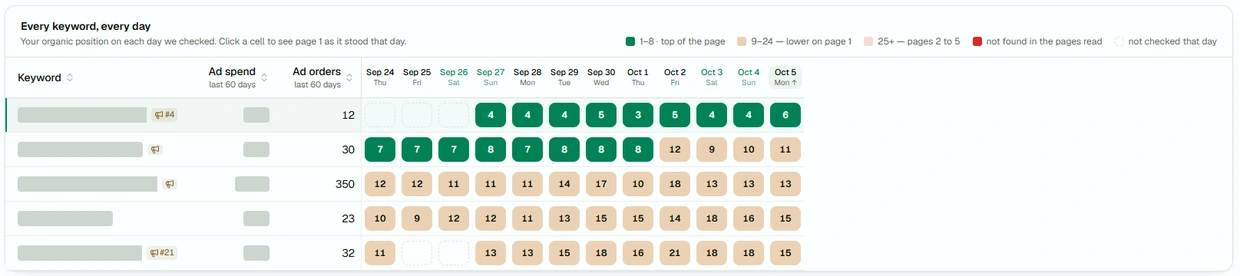
This is the main screen. A row is a keyword, a column is a day, and the cell holds the book's position without ads. The colors:
- green — positions 1–8, top of page one;
- beige — 9–24, lower on page one;
- pink — pages two to five;
- red — the book wasn't found.
Next to each keyword are two columns from your ads: what you spent on it and how many orders it brought in 60 days.
What we saw here:
- The second keyword slipped. Through October 1 it held positions 7–8; from October 2 it's at 9–12. Out of the green zone into beige. Three days of sales don't show that yet. The table shows it at once.
- The third keyword brought 350 ad orders in 60 days, while the book itself ranks 10–18 for it. It's the keyword that earns the most, and the book hasn't reached the top of the page for it without help. Not a place to cut the ad.
- The first keyword sits steadily at positions 3–6. Here the book holds its place without the ad.
One keyword's chart, with a competitor

Click a keyword and its chart opens. On October 5 our book was #6 of 24, down from #4 the day before. You can put another book on the same chart: the dashed line is a competitor that climbed from #7 to #4 in a week and passed us. Now the drop makes sense. We didn't get worse; the neighbor sold more.
What to do with the numbers
A keyword slipped from the top of the page. Look for the cause the same day:
- you changed the price, cover or description;
- the buy button disappeared or the book is temporarily unavailable;
- the ad on that keyword ran out of budget, or you lowered the bid;
- a competitor launched a discount or pushed ads hard — the competitor chart shows that.
A keyword brings many ad orders, but the book ranks low for it. Keep the ad: without it the book is barely visible for that search. Among the things that shape search order, Amazon itself names past sales history, availability, popularity and how long the book has been listed (KDP Help: Search Results). So, in our experience, ad sales gradually pull the organic position up too. Amazon guarantees a top spot to no one.
The book ranks high and its own ad sits next to it. You can carefully test whether you're paying for a shopper who would have bought anyway: lower the bid one step and watch the book's total sales for at least 7 days, not just ad sales. If they fall, put it back.
The book isn't in the first five pages. First check that the keyword is in the listing itself: the title, the subtitle or the seven KDP keyword boxes. How to choose them is in our KDP keywords guide.
Which keywords to track
Not everything. Start with the ones the book already sells on:
- In AuthorLens, open a campaign and its Searches tab: shopper searches with orders. How to read that report is in Negative Keywords for Amazon Book Ads.
- Tick the searches that brought sales.
- Press Track rankings and they appear on the Rankings screen.
Five to twenty keywords is enough for one book. The tool checks up to 500 a day.
Our take
Keyword rankings show what neither the KDP report nor the ad console does: where the book sells by itself and where it stands only on ads. Look every day, and judge a change to the listing or bids no sooner than 7 days after it. We use AuthorLens daily and recommend it.
FAQ
What is a book's organic rank on Amazon?
Its place in Amazon search results for a specific keyword, not counting placements marked Sponsored.
How do I check my book's keyword ranking by hand?
Open amazon.com in a private window, set a US delivery address, type the search and count the books in order, skipping Sponsored ones.
Why do I see different results than shoppers do?
Amazon adjusts results to purchase history and delivery address. That is why you check in a private window with a US address.
How many keywords should I track?
Five to twenty per book is enough — the ones it already sells on. AuthorLens checks up to 500 keywords a day.
My book dropped in search — what do I do?
Check whether you changed the price, cover or bid, whether the book is available to buy, and whether a competitor passed you. The cause is easiest to find the same day.
Do ads affect organic ranking on Amazon?
Indirectly. Among the factors behind search order Amazon names past sales history and popularity. In our experience, ad sales on a keyword gradually improve the organic position for it.
Royalties and ad spend per book, side by side — the way we track our own books. It also shows the highest ACOS each book can afford. Leave your email and we'll send it.
One email a week at most. Unsubscribe in one click.
Real campaign numbers, not theory. One recent case: the same keyword in two match types — broad at 9% ACOS, exact at 49%. In the Facebook group KDP Ads & Profit we break down cases like this every week.
Join the group →or follow Darya on LinkedIn

Selling books on Amazon KDP since 2023, 77,600+ copies sold. Every number in these articles comes from our own KDP and Amazon Ads accounts.
All articles