Tools compared
AIWriteBook review: how we made a KDP book for about $20
We found a topic that sells and made a 122-page book in AIWriteBook for about $20 — proofread, with a cover and every KDP file. Below: the whole path step by step, what each step cost in credits, and the code DARIA20 for 20% off.
How much does it cost to make a book for Amazon? Hiring it out, done-for-you, starts at $750. We made a 122-page book for about $20: proofread, with a cover and every file KDP needs.
And we started with the market, not the book: first we found a topic people actually buy, and only then opened AIWriteBook. Below is the whole path, step by step: how we picked the topic, wrote the book, checked it for errors, and what it cost.
What AIWriteBook is
AIWriteBook is a tool that takes a book from idea to publishing on Amazon KDP: outline, chapters, proofreading, cover, description, categories, keywords and ready-to-upload files for print and Kindle.
More than 30,000 authors use it, more than 40,000 books have been written in it, and it's rated 4.7 out of 5 from 536 reviews.
Step 1. Find a topic people buy
We searched for the topic in AuthorLens: vagus nerve exercises, or how to calm your nervous system in a few minutes a day. We use AuthorLens daily and have a business relationship with it.
The search shows dozens of books by regular independent authors, priced $15–18, many with hundreds of reviews.
Then we opened one competing book. It's not a publisher, just an independent author. The book came out in April 2026, has 191 pages, and is already #1 in its category. AuthorLens estimates it sells about 500 copies a month — roughly $3,300 in royalties a month.

We checked the same thing on Amazon itself: independent author, April, 191 pages, a Best Sellers Rank around 10,000 across all books. It all matches. Topic chosen.
Step 2. The book idea
In AIWriteBook we described the idea in a few sentences: a 21-day program, 5 minutes a day, for busy people living with constant stress. And we added the important part right away: no promises to cure anything, just simple habits and advice to talk to a doctor. It's a health topic, so it needs care.
The tool suggested a title, subtitle, audience and tone on its own. You can edit any of it.
Step 3. Structure and chapter outline
The tool offers several ways to structure the book. We picked this one: three weeks, each with its own exercises. Then comes the chapter outline with a short summary of each chapter. You can rewrite any chapter or add a new one.
Step 4. Chapters
Each chapter takes about a minute to write — around 3,000 words. You choose the model: Gemini (15 credits per chapter) or Claude (30 credits).
On the right side of the editor there's an AI assistant: you type what to change in a chapter, it shows the edit, and you accept it.
Step 5. Proofreading
We don't want to put a book with errors on Amazon, so we always proofread.
First the tool reads the whole book like an editor, gives it a score and lists what to fix first. We got 79 out of 100. The notes were spot on:
- the title promises a 21-day plan, but it isn't laid out day by day anywhere;
- the scientists whose methods the book describes should be named.
Then the editor goes through every chapter and suggests edits — you accept or reject each one. We had more than 200 edits across 11 chapters.
And we fixed the main issues:
- we added a separate chapter with the 21-day plan: one 5-minute exercise and one evening question per day, with a tracker at the end to mark each day;
- in the chapters that describe methods, we named their authors. That takes one request to the AI assistant.
Step 6. Description, categories, keywords and cover
At the Metadata step the tool writes the description for the Amazon book page and picks 3 categories and 7 keywords — exactly as many as KDP allows.

The tool makes the cover in several versions — we got three and picked the best. There are 20 cover styles in total.
Step 7. Files for KDP
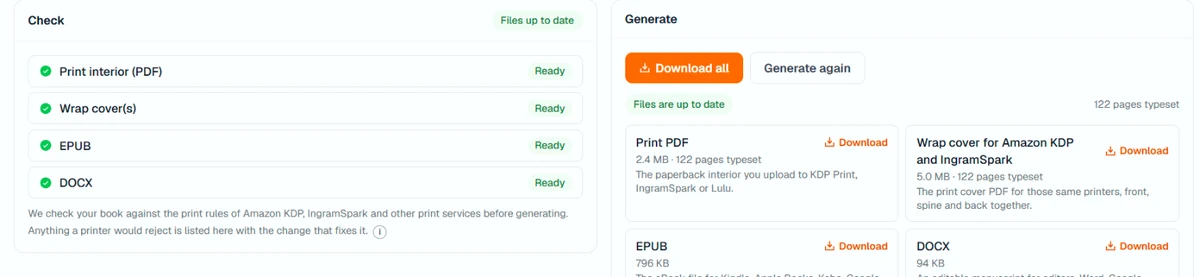
At the Format step we chose 6 × 9 inches, white paper and black-and-white print. That came out to 122 pages. The tool checks the files against KDP's rules itself — ours showed "Nothing blocking". The finished files are in the image at the top of this article.
You get:
- a print-ready PDF interior;
- a wrap cover with a spine sized to the page count;
- an EPUB for Kindle;
- a Word file.
For publishing there's a free Chrome extension that fills in the KDP pages for you — title, description, categories, keywords, files. You click "Publish" yourself.
What our book cost
Which plan you need. For one proofread book, the Plus plan at $20 a month is enough: it gives 1,000 credits, just right for a book like ours. To make two or more books a month, you need Pro at $50: 5,000 credits, up to 5 proofread books. The free plan (100 credits) covers only the outline and the first chapter, which is enough to try it.
AIWriteBook runs on credits. Here's what went into our book:
| Step | Credits |
|---|---|
| Book outline | 33 |
| 11 chapters on Gemini | 150 |
| 21-day plan chapter on Claude | 30 |
| Cover | 90 |
| Print and Kindle files | 200, once per book |
| Proofreading the whole book | 484 |
| 3 AI assistant edits | 15 |
| Total | 1,002 |
That's almost exactly one month of the Plus plan — about $20. On the Pro plan the same book comes to about $10. With the code DARIA20 the first month of Plus is $16.
For comparison: a done-for-you book from a freelancer costs $750–1,000.
And what it can earn. Printing a 122-page book on KDP costs $2.46. At a $16.99 list price that leaves about $7.73 in royalties per copy. You can run your own numbers in our KDP royalty calculator.
What a typical book costs
A 10-chapter book is roughly 27,000 words and about 90 pages:
- budget (chapters on Gemini, no proofreading) — about 460 credits, or $9 on Plus;
- best quality (chapters on Claude plus proofreading) — about 1,060 credits, or about $21 on Plus.
On Pro the same books come to $5–11.
Plans
| Plan | Per month | Credits per month |
|---|---|---|
| Free | $0 | 100 |
| Plus | $20 | 1,000 |
| Pro | $50 | 5,000 |
The free plan covers the book outline and the first chapter — enough to see whether it's for you. Plus is 1–2 books a month; Pro is up to 5 proofread books or up to 10 budget ones.
A code for our readers
Enter it at checkout on the AIWriteBook site; it works on any plan. You can start for free: the outline and first chapter cost nothing.
Try AIWriteBook freeThis is an affiliate link: if you buy through it, we earn a commission at no extra cost to you.What else is inside
Besides the book itself, AIWriteBook has KDP tools: niche search across 8 Amazon marketplaces, keyword and category research, competitor analysis, trends, book description, author bio, A+ content, book translation and audiobooks.
Who it's for
It's a fit if you want to make the book yourself, and fast: non-fiction, guides, practical books. Especially if proofreading, the cover, formatting and KDP files have been holding you back.
It's not a fit if you want a finished book with no involvement at all. You still choose the topic, the outline and the edits.
The book is out — what next
The book is only the beginning. How much it earns after ads, and how to tune those ads, we track in AuthorLens. Write in AIWriteBook, track profit in AuthorLens.
Connect your ads and royalties — the last three months arrive within minutes. You'll see profit per book and what Ad Coach suggests changing in your ads. First 7 days for $1, then $39.99 a month.
Try AuthorLensFor now AuthorLens only reads your data: it doesn't change bids or campaignsFAQ
Can I try AIWriteBook for free?
Yes. The free plan gives 100 credits: enough for the book outline and the first chapter.
How much does one book cost in AIWriteBook?
Our 122-page proofread book took 1,002 credits, about $20 on the Plus plan. A 10-chapter book is $9–21 on Plus or $5–11 on Pro.
Does AIWriteBook proofread the book?
Yes. The editor scores the book, lists what to fix first and suggests edits for every chapter. You accept or reject each edit.
What files do I get?
A print-ready PDF, a wrap cover with spine, an EPUB for Kindle and a Word file.
Where do I enter the code DARIA20?
At checkout on the AIWriteBook site: 20% off your first payment on any plan.
Royalties and ad spend per book, side by side — the way we track our own books. It also shows the highest ACOS each book can afford. Leave your email and we'll send it.
One email a week at most. Unsubscribe in one click.
Real campaign numbers, not theory. One recent case: the same keyword in two match types — broad at 9% ACOS, exact at 49%. In the Facebook group KDP Ads & Profit we break down cases like this every week.
Join the group →or follow Darya on LinkedIn

Selling books on Amazon KDP since 2023, 77,600+ copies sold. Every number in these articles comes from our own KDP and Amazon Ads accounts.
All articles